The best ergonomic keyboards for carpal tunnel, ranked on wrist relief, adjustability and fit, comfort, ease of adaptation, and value, from a familiar curved board that helps most people to a fully contoured design for severe RSI.
Updated August 17, 20265 rankedNo paid placements
We may earn a commission when you buy through our links.
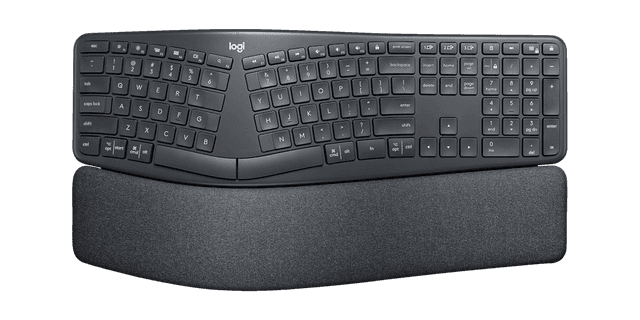
The best pick for most carpal-tunnel sufferers because it delivers real ergonomic relief with almost no downside. Its curved, split keyframe opens the hands to ease ulnar deviation and its pillowed rest with a negative tilt keeps the wrists level, yet the layout is unchanged so you type at full speed from day one. That combination of proven design, United States Ergonomics certification, near-zero learning curve, and a reasonable ~$130 price is why it outranks even the more thorough Kinesis: it helps the most people with the least friction.
Curved split keyframe eases ulnar deviation without changing the layoutPillowed wrist rest and negative tilt keep wrists level, not cocked upwardNear-zero learning curve: full typing speed from day oneFixed curve, so you cannot separate or tent the halvesWrist rest is integrated and non-removable
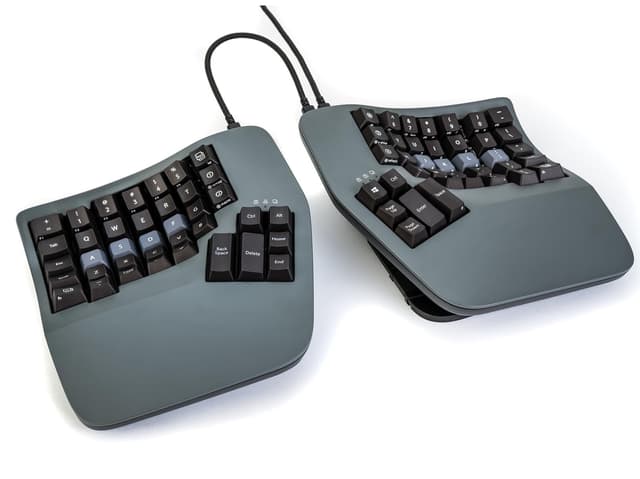
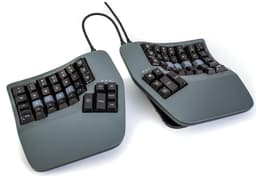
The most complete relief on the list, and the right choice when carpal tunnel is diagnosed or severe. It is the only pick that tackles all three strain drivers at once: full split for deviation, tenting for pronation, and concave key wells with thumb clusters to offload the pinkies. It ranks second, not first, only because that completeness carries a steep learning curve and a ~$449 price that most buyers do not need; for those who do, nothing here protects the wrists better.
Addresses all three strain drivers: deviation, pronation, and finger travelFully separable halves with built-in adjustable tentingConcave key wells and thumb clusters offload the weaker pinky fingersSteep learning curve; expect a week or more to regain full speedAround $449, by far the priciest pick here
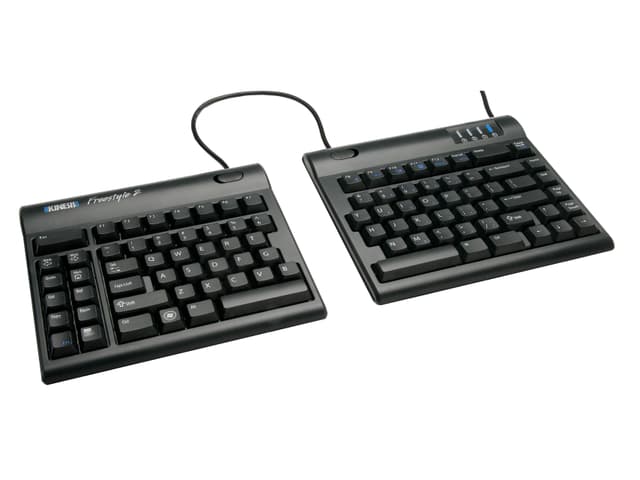
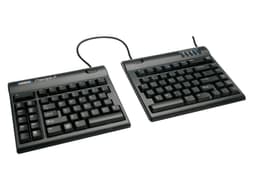
The best value for a genuine split, and the sweet spot for buyers who want to cut ulnar deviation without relearning or overspending. Its two halves separate up to 9 inches while keeping a completely standard flat layout, and TechGearLab made it an Editors' Choice for exactly this balance of effectiveness and price. It lands third because the base board lies flat (you add the VIP3 kit for tenting and palm support), but at ~$109 it undercuts every other split here.
Splits and separates up to 9 inches to match your shoulder widthStandard flat layout means almost no learning curveLow-force membrane switches are easy on the fingersLies flat by default, so tenting and palm rests need the extra VIP3 kitMembrane switches lack the feedback enthusiasts prefer
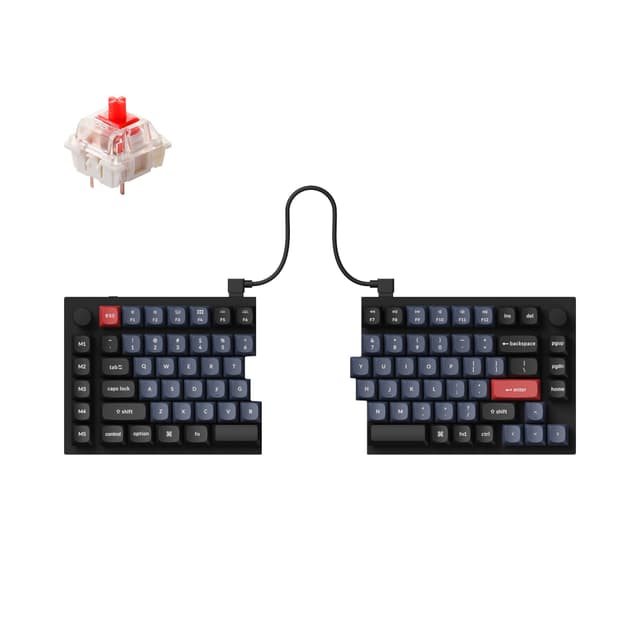
The pick for enthusiasts who want a fully split board that also feels like a premium mechanical keyboard, with hot-swap switches, an aluminum body, knobs, and QMK/VIA programming that PCWorld and Tom's Guide both praise. It ranks below the purpose-built ergonomic picks for one carpal-tunnel-specific reason: it ships without any tenting kit or wrist rest, so the negative tilt and forearm relief those provide must be bought separately on a board that already costs ~$204.
Fully separable halves position each hand at shoulder widthPremium CNC aluminum build with hot-swap switches and PBT keycapsFull QMK/VIA programmability plus two handy rotary knobsNo tenting kit or wrist rest included, so key ergonomic extras cost moreHeavy aluminum halves and a fairly short inter-half cable
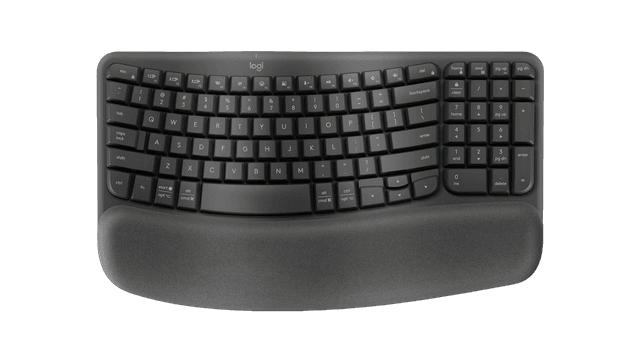
The budget pick and the gentlest starting point, best for early or mild symptoms and prevention. Its wave-shaped one-piece layout and cushioned memory-foam palm rest support a neutral wrist for around $60 with zero relearning. It ranks last because it is the mildest intervention here (not a true split and without tenting), so it does less for the wrist than the picks above, but as a low-risk first step it is hard to beat on price.
Wave-shaped keys and cushioned palm rest support a neutral wristAround $60, the most affordable pick hereCompact one-piece design suits tight desksNot a true split, the mildest ergonomic intervention hereNo tenting and only a shallow wrist angle versus the K860
The best keyboard for carpal tunnel is the one that fixes how your wrists sit while you type, not the one with the most features. Carpal tunnel syndrome comes from pressure on the median nerve where it passes through the wrist, and three everyday typing habits raise that pressure: bending the wrists upward toward the screen (extension), angling the hands outward toward the little finger to reach a flat keyboard's edges (ulnar deviation), and rolling the forearms flat against the desk (pronation). Every ergonomic keyboard is really just a set of answers to those three problems, so the smart way to shop is to match the design to how many of them you need solved. Negative tilt (where the front of the keyboard sits higher than the back) flattens the wrist and fights extension; a split or curved layout opens the hands to reduce deviation; and tenting, which raises the keyboard's center so each half slopes outward, rotates the forearms to a neutral handshake angle and fights pronation. A board that addresses all three, like the Kinesis Advantage360 Pro with its contoured key wells, full split, and built-in tenting, offers the most relief and is the right tool for diagnosed or severe cases, but it asks for a real learning curve and a premium price. If your symptoms are milder, or you simply cannot afford a week of slower typing, a curved one-piece board such as the Logitech Ergo K860 delivers a large share of the benefit with essentially no relearning, which is why it is our top overall pick. Between those extremes sits the separable split: the Kinesis Freestyle2 keeps a normal flat layout but lets you slide the halves apart to your own shoulder width, an easy and affordable way to cut deviation, with tenting available as an add-on kit. Beyond the core geometry, weigh a few practical things. Adaptation time matters more than shoppers expect: a contoured columnar board can take one to two weeks to master, while curved and flat-split boards feel familiar immediately, so be honest about how much disruption you can tolerate. Switch feel and actuation force affect finger effort: lighter membrane or quiet scissor switches ask less of sore hands, though mechanical boards can feel more precise. A wrist rest keeps the wrist supported and neutral during pauses, and whether tenting is built in or a separate purchase changes the real cost. Two common mistakes cost buyers the most. The first is chasing the most aggressive design when mild symptoms would respond to a gentler, easier board; a keyboard you abandon after three frustrating days helps no one. The second is buying purely on price and ending up with a board that solves none of the three problems, when spending a little more on a genuine split or curve would have addressed the actual cause. Finally, remember that a keyboard is one part of the picture: pair it with a neutral wrist posture, an appropriate chair and desk height, regular breaks, and, if your symptoms are diagnosed or worsening, professional medical advice. An ergonomic keyboard can meaningfully reduce strain, but it is not a cure. TopsFive does not test these keyboards in-house; our rankings draw on published manufacturer specifications, independent expert reviews, and verified owner feedback.
Rankings are built from published manufacturer specifications, independent expert reviews and guides (including PCWorld, Tom's Hardware, Tom's Guide, TechGearLab, and PC Gamer), and verified owner feedback, cross-checked against current retailer listings for pricing and availability. TopsFive does not test these keyboards in-house. Because the point of an ergonomic keyboard is to relieve the wrist, we weight ergonomic design and wrist relief most heavily (how well each board addresses wrist extension, ulnar deviation, and forearm pronation), followed by adjustability and fit, comfort and typing feel, ease of adaptation, and value. An ergonomic keyboard can reduce strain but is not a cure; anyone with diagnosed or worsening carpal tunnel should also consult a clinician.
Ergonomic Design & Wrist Relief
How well the layout addresses wrist extension, ulnar deviation, and forearm pronation (the core of carpal-tunnel relief)
35%
Adjustability & Fit
Split, tenting, and wrist-support adjustability and how well the board fits different hands and desks
20%
Comfort & Typing Feel
Switch feel, actuation force, and cushioning across a full day of typing
15%
Ease of Adaptation
How quickly you regain full typing speed: familiar layouts versus a steep relearn
15%
Value
Price versus ergonomic capability and included accessories
Can an ergonomic keyboard actually help carpal tunnel?
It can reduce the strain that aggravates symptoms, but it is not a cure. Carpal tunnel is caused by pressure on the median nerve at the wrist, and three typing habits make it worse: bending the wrists upward (extension), angling the hands outward toward the pinky (ulnar deviation), and rolling the forearms flat (pronation). Ergonomic keyboards fight these with negative tilt, a split or curved layout, and tenting respectively. The more of the three a keyboard addresses, the more it helps, but relief also depends on posture, breaks, and, for diagnosed cases, medical care. Treat the keyboard as one part of the solution, not the whole of it.
Do I need a full split keyboard, or is a curved one enough?
It depends on how severe your symptoms are. For mild tension or prevention, a curved one-piece board like the Logitech Ergo K860 (or even the gentler Wave Keys) eases the hands outward and supports the wrists while asking for no relearning. For moderate pain, a separable split such as the Kinesis Freestyle2 lets you set each half to your own shoulder width, which reduces deviation more directly. For diagnosed or severe RSI, a fully split and tented board like the Kinesis Advantage360 Pro addresses every strain driver at once. Start with the least disruptive design that matches your symptoms.
How long does it take to get used to a split or contoured keyboard?
It varies by design. A curved one-piece board like the K860 or the Wave Keys keeps a normal layout, so most people type at full speed immediately. A flat split like the Freestyle2 feels familiar too, since only the spacing changes. A contoured, columnar board like the Advantage360 Pro is the big adjustment: expect roughly one to two weeks of slower typing while your muscle memory adapts to the key wells and thumb clusters. That learning curve is the main reason the Advantage360 is not our top overall pick despite offering the most relief.
What is tenting, and does it matter for carpal tunnel?
Tenting raises the center of the keyboard so each half slopes down toward the outer edges, letting your forearms rotate to a more neutral, handshake-like angle instead of lying flat. That reduces pronation, one of the three drivers of wrist strain, and many people find it the single most comfortable adjustment. The Advantage360 Pro has tenting built in; the Freestyle2 and Keychron Q11 can be tented only with an add-on accessory, and the K860 and Wave Keys offer a fixed negative tilt rather than adjustable tenting. If forearm rotation is a big source of your discomfort, prioritize a board that tents.
Are membrane or mechanical switches better for sore wrists?
Neither is automatically better: what matters most is layout and posture, not switch type. That said, a lighter actuation force means less finger effort per keystroke, which some sore-handed typists prefer; the Freestyle2's low-force membrane and the K860 and Wave Keys' quiet scissor and membrane switches all keep effort modest. Mechanical boards like the Keychron Q11 and the Advantage360 Pro can feel more precise and satisfying, and the Advantage360 uses quiet, relatively light mechanical switches. Choose the switch feel you will enjoy typing on, then let the keyboard's shape do the ergonomic work.