Kinesis Freestyle2 Ergonomic Keyboard vs Keychron Q11 Split Keyboard
The two best fully separable split keyboards below the premium tier: choose the Kinesis Freestyle2 for the cheapest, most familiar way to cut wrist deviation at around $109, or the Keychron Q11 if you want a premium mechanical board that also splits at around $204.
We may earn a commission when you buy through our links.
TopsFive comparison scores
Side by side
| Kinesis Freestyle2 Ergonomic Keyboard | Keychron Q11 Split Keyboard | |
|---|---|---|
| Layout Type | Flat split | 75% split (mechanical) |
| Split Design | Separable up to 9 in (20 in option) | Fully separable halves (bridge cable) |
| Tenting | Optional (VIP3 kit, 5°/10°/15°) | None (add-on required) |
| Wrist Rest | Optional (VIP3 palm pads) | None |
| Switch Type | Low-force membrane | Hot-swap mechanical |
| Connectivity | Wired USB | Wired USB-C |
| Programmable | No (dedicated hotkeys) | Fully (QMK/VIA) |
| Numpad | No (optional keypad) | No (75% layout) |
| Price | Check price → | Check price → |
How they differ in real use
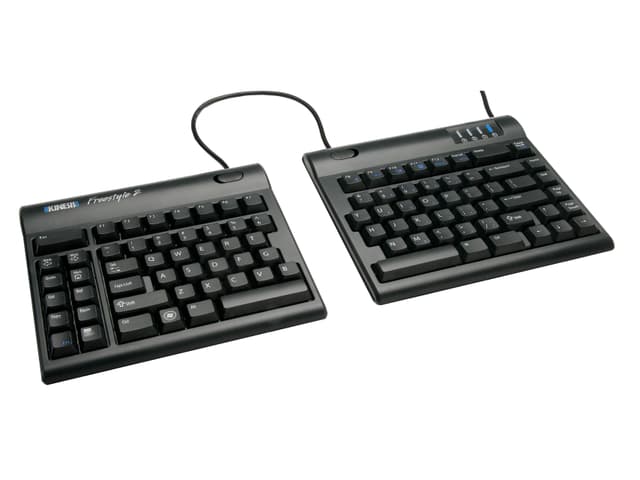
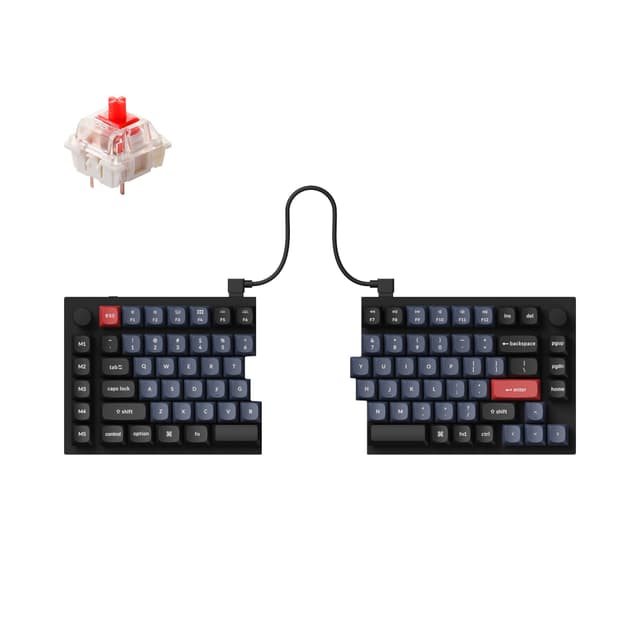
Both of these keyboards let you pull the two halves apart and set each to your own shoulder width, which is the core move for reducing ulnar deviation, but they are built for different owners and the ~$95 price gap buys very different things. The Freestyle2 is a purpose-built ergonomic office keyboard: a completely standard flat layout split into two light halves that separate up to 9 inches (a 20-inch version exists), with low-force membrane switches that are gentle on tired fingers. TechGearLab made it an Editors' Choice precisely because it delivers a real split cheaply and with almost no learning curve. Its limitation for carpal tunnel is that it lies flat out of the box; tenting and palm supports come only with the separate VIP3 accessory kit, so getting the full benefit costs a little more. The Q11 comes at the same problem from the enthusiast direction. It is a 75% mechanical keyboard cut into two separable halves, with a CNC aluminum body, hot-swappable switches, PBT keycaps, twin knobs, and full QMK/VIA programmability that PCWorld and Tom's Guide both praise for build and customization. What it does not include, tellingly for this list, is any tenting kit or wrist rest, so while it splits, it leaves the negative tilt and forearm support to accessories you buy yourself, on a board that is already heavier and pricier. The Freestyle2 is the medically-minded value pick; the Q11 is the keyboard-lover's split that happens to be ergonomic.
Kinesis Freestyle2 Ergonomic Keyboard
- Splits and separates up to 9 inches to match your shoulder width
- Standard flat layout means almost no learning curve
- Low-force membrane switches are easy on the fingers
- TechGearLab Editors' Choice for value and effectiveness
- Lies flat by default, so tenting and palm rests need the extra VIP3 kit
- Membrane switches lack the feedback enthusiasts prefer
- Some testers find the keys a touch small
Keychron Q11 Split Keyboard
- Fully separable halves position each hand at shoulder width
- Premium CNC aluminum build with hot-swap switches and PBT keycaps
- Full QMK/VIA programmability plus two handy rotary knobs
- Praised by PCWorld and Tom's Guide for build and customization
- No tenting kit or wrist rest included, so key ergonomic extras cost more
- Heavy aluminum halves and a fairly short inter-half cable
- Priced around $204 despite missing those ergonomic accessories
Which should you buy?
Choose the Kinesis Freestyle2 if your priority is wrist relief for the least money and the least fuss: it splits, it keeps a familiar layout, its light switches are easy on sore hands, and at around $109 it is the value choice; add the VIP3 kit if you want tenting. Choose the Keychron Q11 if you also care about how a keyboard feels and want to type on premium mechanical switches you can hot-swap and program, and you do not mind sourcing your own tenting and wrist support. Go Freestyle2 for purpose-built, affordable ergonomics; go Q11 for a premium mechanical board that splits.
Choose the Kinesis Freestyle2 Ergonomic Keyboard if
- Buyers who want a real split at the lowest price
- People who want relief without relearning their layout
- Setups that benefit from wide half-to-half separation
Skip it if
- Anyone who wants tenting built in without buying an add-on
- Mechanical-switch enthusiasts
Choose the Keychron Q11 Split Keyboard if
- Mechanical-keyboard enthusiasts who also want a split
- Typists who value hot-swap switches and QMK programming
- People who will add their own tenting and wrist support
Skip it if
- Buyers who want ergonomic tenting and a wrist rest in the box
- Anyone after the lightest or cheapest split option
Common questions
Which one does more for carpal tunnel out of the box?
The Freestyle2, marginally, and mostly because of what each includes. Both separate to cut ulnar deviation, but the Freestyle2 is designed as an ergonomic tool with light, low-effort switches, and its VIP3 accessory adds tenting and palm supports when you want them. The Q11 splits just as well but ships with no tenting kit or wrist rest, so on day one it addresses deviation only. For pure carpal-tunnel relief per dollar, the Freestyle2 is the more complete starting point; the Q11 needs accessories to catch up.
Is the Q11 worth nearly twice the price of the Freestyle2?
Only if you value the mechanical experience. The extra money buys a CNC aluminum body, hot-swappable mechanical switches, PBT keycaps, rotary knobs, and QMK/VIA programming: things typing enthusiasts care about but that are not, strictly, ergonomic upgrades. If your goal is wrist relief and you would not use the customization, the Freestyle2 gives you the same fundamental split for far less. If you will genuinely enjoy tuning switches and keymaps, the Q11's quality is real and the premium is easier to justify.
Can both be tented for a more neutral forearm angle?
Yes, but neither includes it. The Freestyle2 tents with the Kinesis VIP3 accessory, which adds 5, 10, or 15 degrees plus palm pads. The Q11 has no first-party tenting kit, so owners typically improvise with stands or third-party supports. If adjustable tenting matters to you and you want it handled cleanly, the Freestyle2 plus VIP3 is the more straightforward path, and if built-in tenting is a must, the Kinesis Advantage360 Pro on our main list includes it without any add-on.