Logitech Ergo K860 vs Logitech Wave Keys
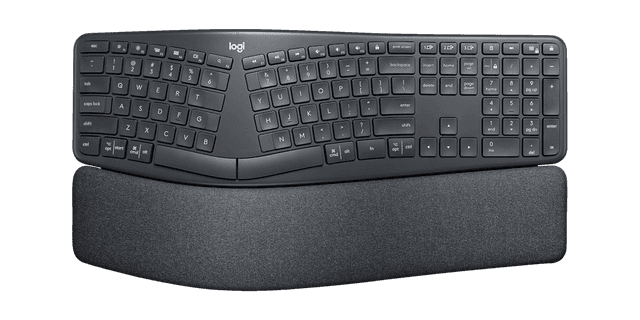
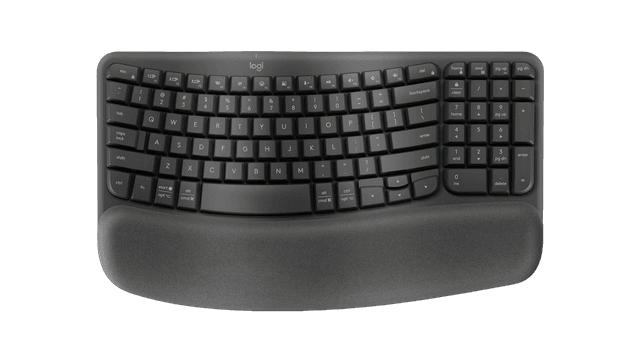
Logitech Ergo K860 (#1, best overall) vs Logitech Wave Keys (#5, best budget): in our Keyboards for Carpal Tunnel scoring the Logitech Ergo K860 totals 8.8/10 and the Logitech Wave Keys 7.6/10.
We may earn a commission when you buy through our links.
TopsFive comparison scores
Side by side
| Logitech Ergo K860 | Logitech Wave Keys | |
|---|---|---|
| Layout Type | Curved split (one-piece) | Wave-shaped (one-piece) |
| Split Design | Fixed integrated split | None (integrated wave) |
| Tenting | Negative tilt (0°/-4°/-7° front feet) | None |
| Wrist Rest | Pillowed, integrated | Cushioned, integrated |
| Switch Type | Scissor (quiet) | Quiet membrane |
| Connectivity | Bluetooth + USB receiver | Bluetooth + Logi Bolt |
| Programmable | Logi Options+ remap | Logi Options+ remap |
| Numpad | Yes (full size) | Yes (full size) |
| Price | Check price → | Check price → |
How they differ in real use
Built from our keyboards for carpal tunnel scoring, each product's published specifications, and verified owner feedback — not hands-on testing.
Both the Logitech Ergo K860 and the Logitech Wave Keys made our Top 5 Keyboards for Carpal Tunnel, at #1 (best overall) and #5 (best budget). The best pick for most carpal-tunnel sufferers because it delivers real ergonomic relief with almost no downside. Its curved, split keyframe opens the hands to ease ulnar deviation and its pillowed rest with a negative tilt keeps the wrists level, yet the layout is unchanged so you type at full speed from day one. That combination of proven design, United States Ergonomics certification, near-zero learning curve, and a reasonable ~$130 price is why it outranks even the more thorough Kinesis: it helps the most people with the least friction. The budget pick and the gentlest starting point, best for early or mild symptoms and prevention. Its wave-shaped one-piece layout and cushioned memory-foam palm rest support a neutral wrist for around $60 with zero relearning. It ranks last because it is the mildest intervention here (not a true split and without tenting), so it does less for the wrist than the picks above, but as a low-risk first step it is hard to beat on price.
We score keyboards for carpal tunnel on Ergonomic Design & Wrist Relief (35%), Adjustability & Fit (20%), Comfort & Typing Feel (15%), Ease of Adaptation (15%) and Value (15%). On that basis the Logitech Ergo K860 totals 8.8 out of 10 and the Logitech Wave Keys 7.6. The widest gap is Ergonomic Design & Wrist Relief, where the Logitech Ergo K860 scores 8.8 against 6.8 for the Logitech Wave Keys: how well the layout addresses wrist extension, ulnar deviation, and forearm pronation (the core of carpal-tunnel relief). Adjustability & Fit also separates them: 8 for the Logitech Ergo K860 versus 6 for the Logitech Wave Keys. The Logitech Wave Keys claws back ground on Value.
On paper, the specifications that actually differ: Layout Type: Curved split (one-piece) on the Logitech Ergo K860 versus Wave-shaped (one-piece) on the Logitech Wave Keys; Split Design: Fixed integrated split on the Logitech Ergo K860 versus None (integrated wave) on the Logitech Wave Keys; Tenting: Negative tilt (0°/-4°/-7° front feet) on the Logitech Ergo K860 versus None on the Logitech Wave Keys; Wrist Rest: Pillowed, integrated on the Logitech Ergo K860 versus Cushioned, integrated on the Logitech Wave Keys; Switch Type: Scissor (quiet) on the Logitech Ergo K860 versus Quiet membrane on the Logitech Wave Keys; Connectivity: Bluetooth + USB receiver on the Logitech Ergo K860 versus Bluetooth + Logi Bolt on the Logitech Wave Keys. They match on Programmable and Numpad.
Check current pricing at the merchant links below. Owners praise the Logitech Ergo K860 for curved split keyframe eases ulnar deviation without changing the layout and pillowed wrist rest and negative tilt keep wrists level, not cocked upward; the most common complaint is fixed curve, so you cannot separate or tent the halves. Owners praise the Logitech Wave Keys for wave-shaped keys and cushioned palm rest support a neutral wrist and around $60, the most affordable pick here; the most common complaint is not a true split, the mildest ergonomic intervention here.
Logitech Ergo K860
- Curved split keyframe eases ulnar deviation without changing the layout
- Pillowed wrist rest and negative tilt keep wrists level, not cocked upward
- Near-zero learning curve: full typing speed from day one
- United States Ergonomics certified; Logitech cites 54% more wrist support
- Fixed curve, so you cannot separate or tent the halves
- Wrist rest is integrated and non-removable
- Larger footprint than a flat board thanks to the built-in rest
Logitech Wave Keys
- Wave-shaped keys and cushioned palm rest support a neutral wrist
- Around $60, the most affordable pick here
- Compact one-piece design suits tight desks
- Wireless via Bluetooth or Logi Bolt, multi-device Easy-Switch
- Not a true split, the mildest ergonomic intervention here
- No tenting and only a shallow wrist angle versus the K860
- Integrated palm rest is not removable
Which should you buy?
The Logitech Ergo K860 is the better fit for most people who want relief without relearning to type and office workers moving from a flat keyboard for the first time; it is the higher-scoring pick here, chiefly for Ergonomic Design & Wrist Relief and Adjustability & Fit. The Logitech Wave Keys is the better fit for early or mild symptoms and prevention and budget buyers who want a low-risk first step, and the stronger choice if Value matters more to you than the overall score. The Logitech Ergo K860 is a poor fit for diagnosed or severe RSI that needs full split and tenting; the Logitech Wave Keys is a poor fit for diagnosed or moderate-to-severe carpal tunnel.
Choose the Logitech Ergo K860 if
- Most people who want relief without relearning to type
- Office workers moving from a flat keyboard for the first time
- Anyone who wants a proven design at a reasonable price
Skip it if
- Diagnosed or severe RSI that needs full split and tenting
- Enthusiasts who want mechanical switches or custom firmware
Choose the Logitech Wave Keys if
- Early or mild symptoms and prevention
- Budget buyers who want a low-risk first step
- Tight desks that can't fit a split keyboard
Skip it if
- Diagnosed or moderate-to-severe carpal tunnel
- Anyone who needs a genuine split or tenting
Common questions
Is the Logitech Ergo K860 better than the Logitech Wave Keys?
In our Keyboards for Carpal Tunnel ranking the Logitech Ergo K860 scores higher overall, 8.8 to 7.6, with the biggest advantage in Ergonomic Design & Wrist Relief. The Logitech Wave Keys is stronger on Value, so it is the better pick if that matters most to you.
What is the main difference between the Logitech Ergo K860 and the Logitech Wave Keys?
The headline spec difference is Layout Type: Curved split (one-piece) on the Logitech Ergo K860 versus Wave-shaped (one-piece) on the Logitech Wave Keys. In use, the gap that matters most is Ergonomic Design & Wrist Relief (8.8 vs 6.8 in our scoring): how well the layout addresses wrist extension, ulnar deviation, and forearm pronation (the core of carpal-tunnel relief).