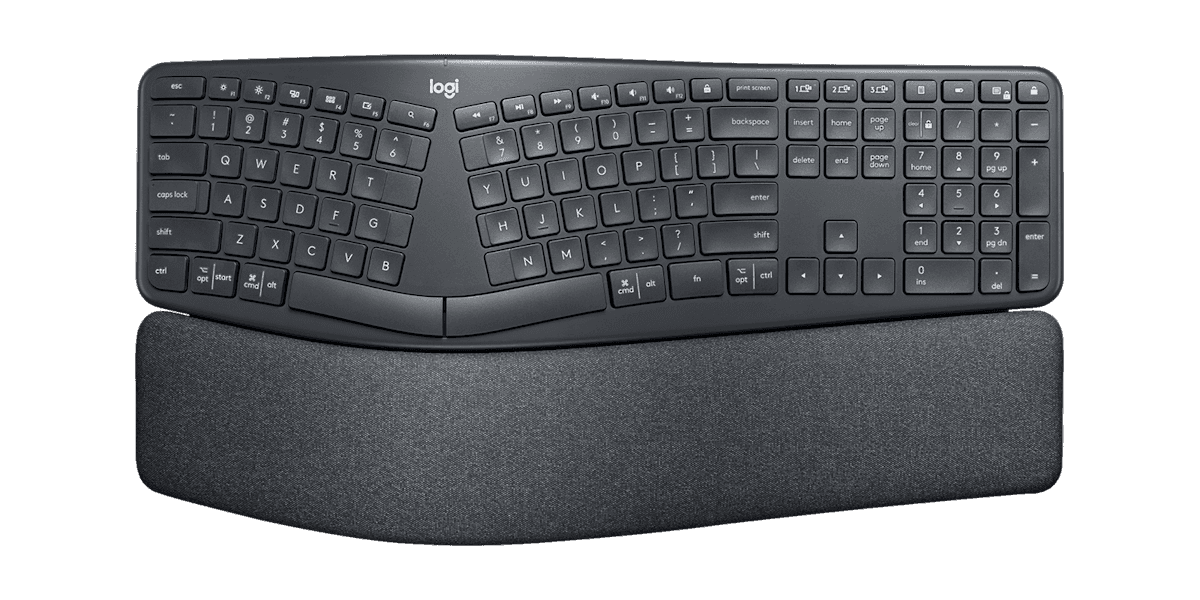
Logitech Ergo K860
The best all-around choice for most people with carpal tunnel, and the easiest to live with day one. The K860 keeps a normal QWERTY layout but bends it into a single curved, split keyframe that opens the hands outward to ease ulnar deviation, then adds a pillowed wrist rest and a slight negative tilt so the wrists sit level rather than cocked upward. Logitech cites United States Ergonomics certification and figures of 54% more wrist support and 25% less wrist bending versus a flat board. Because the layout is unchanged, there is essentially no relearning: you type at full speed immediately. That's why it is the most-recommended and best-selling ergonomic keyboard on Amazon, with a 4.6-star average across thousands of reviews. At around $130 it is also the best value among proven ergonomic designs.
We may earn a commission when you buy through our links.
Our Verdict
The best pick for most carpal-tunnel sufferers because it delivers real ergonomic relief with almost no downside. Its curved, split keyframe opens the hands to ease ulnar deviation and its pillowed rest with a negative tilt keeps the wrists level, yet the layout is unchanged so you type at full speed from day one. That combination of proven design, United States Ergonomics certification, near-zero learning curve, and a reasonable ~$130 price is why it outranks even the more thorough Kinesis: it helps the most people with the least friction.
Score Breakdown
Pros & Cons
Pros
- •Curved split keyframe eases ulnar deviation without changing the layout
- •Pillowed wrist rest and negative tilt keep wrists level, not cocked upward
- •Near-zero learning curve: full typing speed from day one
- •United States Ergonomics certified; Logitech cites 54% more wrist support
- •Quiet scissor keys and dual Bluetooth/USB-receiver connectivity
Cons
- •Fixed curve, so you cannot separate or tent the halves
- •Wrist rest is integrated and non-removable
- •Larger footprint than a flat board thanks to the built-in rest
Specifications
| Layout Type | Curved split (one-piece) |
| Split Design | Fixed integrated split |
| Tenting | Negative tilt (0°/-4°/-7° front feet) |
| Wrist Rest | Pillowed, integrated |
| Switch Type | Scissor (quiet) |
| Connectivity | Bluetooth + USB receiver |
| Programmable | Logi Options+ remap |
| Numpad | Yes (full size) |
Quick Answers
What is the layout type of the Logitech Ergo K860?
Logitech Ergo K860 layout type: Curved split (one-piece).
What is the split design of the Logitech Ergo K860?
Logitech Ergo K860 split design: Fixed integrated split.
What is the tenting of the Logitech Ergo K860?
Logitech Ergo K860 tenting: Negative tilt (0°/-4°/-7° front feet).
What is the wrist rest of the Logitech Ergo K860?
Logitech Ergo K860 wrist rest: Pillowed, integrated.
What is the switch type of the Logitech Ergo K860?
Logitech Ergo K860 switch type: Scissor (quiet).
What is the connectivity of the Logitech Ergo K860?
Logitech Ergo K860 connectivity: Bluetooth + USB receiver.
What is the programmable of the Logitech Ergo K860?
Logitech Ergo K860 programmable: Logi Options+ remap.
What is the numpad of the Logitech Ergo K860?
Logitech Ergo K860 numpad: Yes (full size).
Who is the Logitech Ergo K860 for?
It suits most people who want relief without relearning to type, office workers moving from a flat keyboard for the first time, anyone who wants a proven design at a reasonable price. It is not the right pick for diagnosed or severe RSI that needs full split and tenting, enthusiasts who want mechanical switches or custom firmware.
Is the Logitech Ergo K860 worth buying?
The best all-around choice for most people with carpal tunnel, and the easiest to live with day one. The K860 keeps a normal QWERTY layout but bends it into a single curved, split keyframe that opens the hands outward to ease ulnar deviation, then adds a pillowed wrist rest and a slight negative tilt so the wrists sit level rather than cocked upward. Logitech cites United States Ergonomics certification and figures of 54% more wrist support and 25% less wrist bending versus a flat board. Because the layout is unchanged, there is essentially no relearning: you type at full speed immediately. That's why it is the most-recommended and best-selling ergonomic keyboard on Amazon, with a 4.6-star average across thousands of reviews. At around $130 it is also the best value among proven ergonomic designs. It ranks #1 in our Top 5 Keyboards for Carpal Tunnel. The best pick for most carpal-tunnel sufferers because it delivers real ergonomic relief with almost no downside. Its curved, split keyframe opens the hands to ease ulnar deviation and its pillowed rest with a negative tilt keeps the wrists level, yet the layout is unchanged so you type at full speed from day one. That combination of proven design, United States Ergonomics certification, near-zero learning curve, and a reasonable ~$130 price is why it outranks even the more thorough Kinesis: it helps the most people with the least friction.
Who Is This For?
Best For
- Most people who want relief without relearning to type
- Office workers moving from a flat keyboard for the first time
- Anyone who wants a proven design at a reasonable price
Not For
- Diagnosed or severe RSI that needs full split and tenting
- Enthusiasts who want mechanical switches or custom firmware
Where to Buy
Appears In
Compare Head-to-Head
Customer Reviews
Alternatives to Consider
Kinesis Advantage360 Professional
Kinesis
The most thorough ergonomic keyboard here, and the pick when carpal tunnel is diagnosed or severe. The Advantage360 Pro is the only design on this list that addresses all three biomechanical drivers of wrist strain at once: two fully separable halves cut ulnar deviation, built-in tenting reduces forearm pronation, and deep concave key wells with dedicated thumb clusters shorten finger travel and move heavy keys off the weaker pinkies. Reviewers who have used it long-term, including Tom's Hardware, describe it as exceptionally comfortable once learned. That completeness comes at a cost: a genuinely steep learning curve as your hands adapt to the contoured, columnar layout, and a price around $449 that is several times a mainstream board. It is programmable open-source hardware with quiet mechanical switches, so it rewards people willing to invest the time.
Kinesis Freestyle2 Ergonomic Keyboard
Kinesis
The best value for a true split without the relearning, and a long-standing favorite for wrist relief. The Freestyle2 keeps a completely standard flat QWERTY layout but splits it into two halves you can slide apart up to 9 inches (a 20-inch version is also sold) and angle to your own shoulder width, which directly reduces the ulnar deviation that aggravates the median nerve. TechGearLab named it an Editors' Choice for combining effectiveness with a low price. Its low-force membrane switches are gentle on the fingers, and it feels immediately familiar because nothing about the key arrangement changes. The trade-off is that the base keyboard lies flat: to add tenting and palm supports for negative tilt you buy the separate VIP3 accessory kit, which most carpal-tunnel users will want.
Keychron Q11 Split Keyboard
Keychron
The pick for enthusiasts who want a fully split keyboard that also feels like a premium mechanical board. The Q11 is a 75% layout cut into two separable halves you can place at shoulder width to reduce ulnar deviation, joined by a bridge cable when you want to use it as one piece. It brings the things typists who care about feel look for: a CNC-machined aluminum body, hot-swappable switches, PBT keycaps, two rotary knobs, and open QMK/VIA programming. PCWorld and Tom's Guide both praise its build and customization. The catch for carpal-tunnel buyers specifically is that it ships without a tenting kit or wrist rest, so the negative tilt and forearm relief those add have to be sourced separately, which is why it ranks below the purpose-built ergonomic picks despite its quality.
Logitech Wave Keys
Logitech
The best budget entry point, and the gentlest way to start easing wrist strain for around $60. The Wave Keys is not a split keyboard. It is a compact one-piece board with a wave-shaped key layout that follows the natural curve of the fingertips, paired with a cushioned three-layer memory-foam palm rest that keeps the wrists supported and neutral. It is the mildest ergonomic intervention on this list, so it suits early or mild symptoms rather than diagnosed carpal tunnel, but it asks for zero relearning and earns a 4.3-star average from thousands of owners. Connectivity is wireless over Bluetooth or Logitech's Bolt receiver, and the footprint is small enough for tight desks. Think of it as a low-risk first step before committing to a full split or contoured design.