Logitech Ergo K860 vs Kinesis Advantage360 Professional
The two ends of the ergonomic-keyboard spectrum for carpal tunnel: buy the Logitech Ergo K860 for real wrist relief with no relearning at around $130, or step up to the Kinesis Advantage360 Pro when diagnosed or severe RSI justifies a full contoured, tented split at roughly $449.
We may earn a commission when you buy through our links.
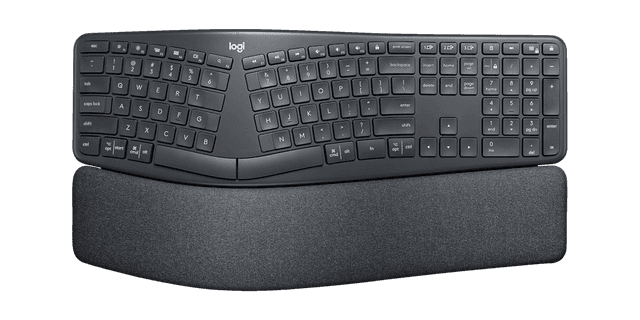
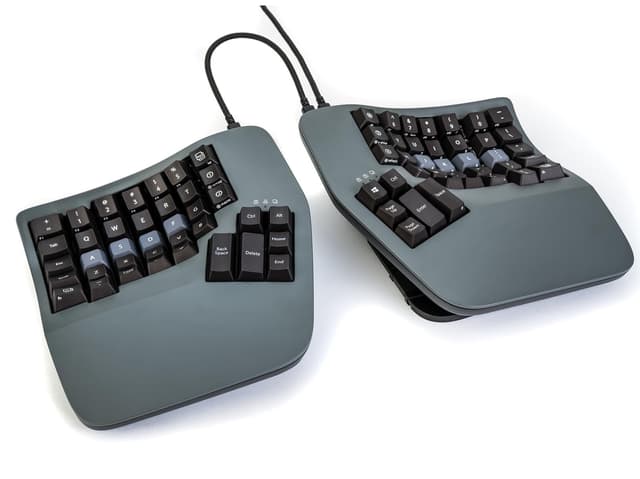
TopsFive comparison scores
Side by side
| Logitech Ergo K860 | Kinesis Advantage360 Professional | |
|---|---|---|
| Layout Type | Curved split (one-piece) | Contoured key wells (split) |
| Split Design | Fixed integrated split | Fully separable halves |
| Tenting | Negative tilt (0°/-4°/-7° front feet) | Adjustable (built-in) |
| Wrist Rest | Pillowed, integrated | Integrated palm supports |
| Switch Type | Scissor (quiet) | Quiet mechanical (Gateron) |
| Connectivity | Bluetooth + USB receiver | Bluetooth + wired USB-C |
| Programmable | Logi Options+ remap | Fully (ZMK/SmartSet, open source) |
| Numpad | Yes (full size) | No (embedded layer) |
| Price | Check price → | Check price → |
How they differ in real use
These two keyboards sit at opposite ends of the effort-versus-relief curve, and the honest choice between them is less about which is better and more about how severe your symptoms are and how much disruption you can absorb. The K860 is a single curved piece that keeps a standard QWERTY layout: its split keyframe opens the hands to ease ulnar deviation, and a pillowed rest with a slight negative tilt keeps the wrists level. Because nothing about the key arrangement changes, you type at full speed from the first minute, the reason it is the best-selling ergonomic keyboard on Amazon and our top overall pick. Its ceiling, though, is fixed: you cannot separate the halves or tent them, so it does nothing for forearm pronation. The Advantage360 Pro answers all three strain drivers at once. Its two halves fully separate to kill deviation, built-in tenting rotates the forearms out of a flat, pronated position, and deep concave key wells with dedicated thumb clusters shorten finger travel and move heavy keys off the weaker pinkies. Reviewers who have lived with it, including Tom's Hardware, call it exceptionally comfortable, once learned. That qualifier is the whole story: the contoured, columnar layout takes a week or two of slower typing to master, and it costs several times what the K860 does. One is the friction-free choice that helps the most people; the other is the maximum-relief tool for those whose wrists genuinely need it and who will invest the time.
Logitech Ergo K860
- Curved split keyframe eases ulnar deviation without changing the layout
- Pillowed wrist rest and negative tilt keep wrists level, not cocked upward
- Near-zero learning curve: full typing speed from day one
- United States Ergonomics certified; Logitech cites 54% more wrist support
- Fixed curve, so you cannot separate or tent the halves
- Wrist rest is integrated and non-removable
- Larger footprint than a flat board thanks to the built-in rest
Kinesis Advantage360 Professional
- Addresses all three strain drivers: deviation, pronation, and finger travel
- Fully separable halves with built-in adjustable tenting
- Concave key wells and thumb clusters offload the weaker pinky fingers
- Quiet mechanical switches and fully programmable open-source firmware
- Steep learning curve; expect a week or more to regain full speed
- Around $449, by far the priciest pick here
- Open-source firmware can be daunting for non-technical users
Which should you buy?
Buy the Logitech Ergo K860 if your symptoms are mild to moderate, you want meaningful relief without a learning curve, or you simply cannot spare a week of reduced typing speed: it is the right call for the large majority of buyers, and at around $130 it is far easier to justify. Step up to the Kinesis Advantage360 Pro if your carpal tunnel is diagnosed or severe, forearm pronation is a real source of your pain, and you are willing to trade a steep adaptation period and a ~$449 price for the most complete protection on the market. Choose the K860 for friction-free relief; choose the Advantage360 Pro for maximum relief you are prepared to work for.
Choose the Logitech Ergo K860 if
- Most people who want relief without relearning to type
- Office workers moving from a flat keyboard for the first time
- Anyone who wants a proven design at a reasonable price
Skip it if
- Diagnosed or severe RSI that needs full split and tenting
- Enthusiasts who want mechanical switches or custom firmware
Choose the Kinesis Advantage360 Professional if
- Diagnosed or severe carpal tunnel and RSI
- Heavy full-day typists who will invest in the learning curve
- People who want tenting, full split, and programmability in one board
Skip it if
- Anyone who needs to type at full speed immediately
- Budget buyers or occasional typists
Common questions
Will the K860 help my carpal tunnel as much as the Advantage360?
Not quite, and the gap is by design. The K860 addresses two of the three strain drivers (it opens the hands to reduce ulnar deviation and tilts the wrists to reduce extension), but its fixed one-piece shape cannot tent, so it does little for forearm pronation. The Advantage360 Pro addresses all three, including pronation, with built-in tenting and contoured key wells. For mild or moderate symptoms the K860's relief is often enough and comes with no learning curve; for severe or diagnosed cases, the Advantage360's extra coverage is worth the effort it demands.
Is the Advantage360 Pro's learning curve really that steep?
It is the single biggest difference in day-to-day use. The K860 keeps a normal layout, so nearly everyone types at full speed immediately. The Advantage360 moves the keys into concave wells and columns with heavy functions on the thumbs, and most people need roughly one to two weeks before their speed recovers. That adjustment is exactly why we rank the K860 first overall despite the Advantage360 offering more relief: a keyboard only helps if you stick with it, and the K860 removes that risk.
Does the price gap reflect a real difference in build?
Partly build, but mostly capability. The Advantage360 Pro is a fully split, tented, programmable open-source board with quiet mechanical switches and concave key wells, far more complex hardware than the K860's molded curved shell with quiet scissor switches. You are paying for the full ergonomic solution and the programmability, not just nicer materials. If you do not need tenting, a full split, or custom firmware, that extra roughly $320 buys capability you will not use, and the K860 is the smarter spend.