Kinesis Advantage360 Professional vs Keychron Q11 Split Keyboard
Kinesis Advantage360 Professional (#2, best premium) vs Keychron Q11 Split Keyboard (#4): in our Keyboards for Carpal Tunnel scoring the Kinesis Advantage360 Professional totals 8.3/10 and the Keychron Q11 Split Keyboard 7.7/10.
We may earn a commission when you buy through our links.
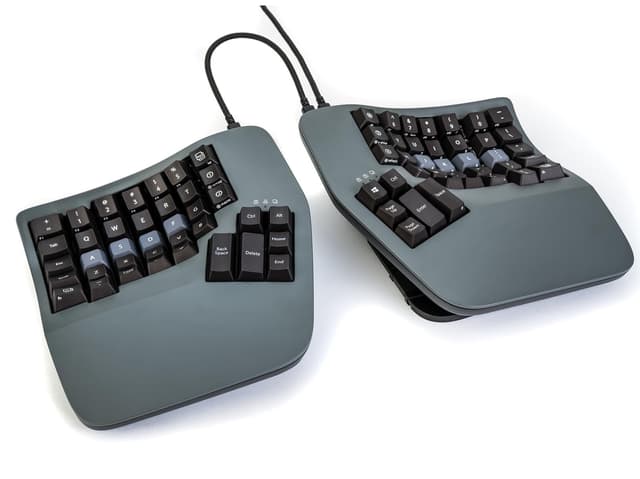
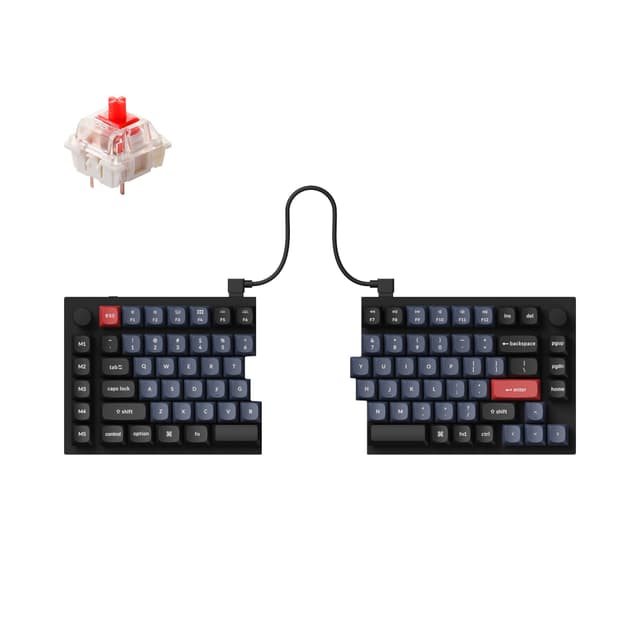
TopsFive comparison scores
Side by side
| Kinesis Advantage360 Professional | Keychron Q11 Split Keyboard | |
|---|---|---|
| Layout Type | Contoured key wells (split) | 75% split (mechanical) |
| Split Design | Fully separable halves | Fully separable halves (bridge cable) |
| Tenting | Adjustable (built-in) | None (add-on required) |
| Wrist Rest | Integrated palm supports | None |
| Switch Type | Quiet mechanical (Gateron) | Hot-swap mechanical |
| Connectivity | Bluetooth + wired USB-C | Wired USB-C |
| Programmable | Fully (ZMK/SmartSet, open source) | Fully (QMK/VIA) |
| Numpad | No (embedded layer) | No (75% layout) |
| Price | Check price → | Check price → |
How they differ in real use
Built from our keyboards for carpal tunnel scoring, each product's published specifications, and verified owner feedback — not hands-on testing.
Both the Kinesis Advantage360 Professional and the Keychron Q11 Split Keyboard made our Top 5 Keyboards for Carpal Tunnel, at #2 (best premium) and #4. The most complete relief on the list, and the right choice when carpal tunnel is diagnosed or severe. It is the only pick that tackles all three strain drivers at once: full split for deviation, tenting for pronation, and concave key wells with thumb clusters to offload the pinkies. It ranks second, not first, only because that completeness carries a steep learning curve and a ~$449 price that most buyers do not need; for those who do, nothing here protects the wrists better. The pick for enthusiasts who want a fully split board that also feels like a premium mechanical keyboard, with hot-swap switches, an aluminum body, knobs, and QMK/VIA programming that PCWorld and Tom's Guide both praise. It ranks below the purpose-built ergonomic picks for one carpal-tunnel-specific reason: it ships without any tenting kit or wrist rest, so the negative tilt and forearm relief those provide must be bought separately on a board that already costs ~$204.
We score keyboards for carpal tunnel on Ergonomic Design & Wrist Relief (35%), Adjustability & Fit (20%), Comfort & Typing Feel (15%), Ease of Adaptation (15%) and Value (15%). On that basis the Kinesis Advantage360 Professional totals 8.3 out of 10 and the Keychron Q11 Split Keyboard 7.7. The widest gap is Ergonomic Design & Wrist Relief, where the Kinesis Advantage360 Professional scores 9.8 against 7.5 for the Keychron Q11 Split Keyboard: how well the layout addresses wrist extension, ulnar deviation, and forearm pronation (the core of carpal-tunnel relief). Ease of Adaptation also separates them: 8 for the Keychron Q11 Split Keyboard versus 5.5 for the Kinesis Advantage360 Professional. The Keychron Q11 Split Keyboard claws back ground on Value.
On paper, the specifications that actually differ: Layout Type: Contoured key wells (split) on the Kinesis Advantage360 Professional versus 75% split (mechanical) on the Keychron Q11 Split Keyboard; Split Design: Fully separable halves on the Kinesis Advantage360 Professional versus Fully separable halves (bridge cable) on the Keychron Q11 Split Keyboard; Tenting: Adjustable (built-in) on the Kinesis Advantage360 Professional versus None (add-on required) on the Keychron Q11 Split Keyboard; Wrist Rest: Integrated palm supports on the Kinesis Advantage360 Professional versus None on the Keychron Q11 Split Keyboard; Switch Type: Quiet mechanical (Gateron) on the Kinesis Advantage360 Professional versus Hot-swap mechanical on the Keychron Q11 Split Keyboard; Connectivity: Bluetooth + wired USB-C on the Kinesis Advantage360 Professional versus Wired USB-C on the Keychron Q11 Split Keyboard.
Check current pricing at the merchant links below. Owners praise the Kinesis Advantage360 Professional for addresses all three strain drivers: deviation, pronation, and finger travel and fully separable halves with built-in adjustable tenting; the most common complaint is steep learning curve; expect a week or more to regain full speed. Owners praise the Keychron Q11 Split Keyboard for fully separable halves position each hand at shoulder width and premium CNC aluminum build with hot-swap switches and PBT keycaps; the most common complaint is no tenting kit or wrist rest included, so key ergonomic extras cost more.
Kinesis Advantage360 Professional
- Addresses all three strain drivers: deviation, pronation, and finger travel
- Fully separable halves with built-in adjustable tenting
- Concave key wells and thumb clusters offload the weaker pinky fingers
- Quiet mechanical switches and fully programmable open-source firmware
- Steep learning curve; expect a week or more to regain full speed
- Around $449, by far the priciest pick here
- Open-source firmware can be daunting for non-technical users
Keychron Q11 Split Keyboard
- Fully separable halves position each hand at shoulder width
- Premium CNC aluminum build with hot-swap switches and PBT keycaps
- Full QMK/VIA programmability plus two handy rotary knobs
- Praised by PCWorld and Tom's Guide for build and customization
- No tenting kit or wrist rest included, so key ergonomic extras cost more
- Heavy aluminum halves and a fairly short inter-half cable
- Priced around $204 despite missing those ergonomic accessories
Which should you buy?
The Kinesis Advantage360 Professional is the better fit for diagnosed or severe carpal tunnel and RSI and heavy full-day typists who will invest in the learning curve; it is the higher-scoring pick here, chiefly for Ergonomic Design & Wrist Relief and Adjustability & Fit. The Keychron Q11 Split Keyboard is the better fit for mechanical-keyboard enthusiasts who also want a split and typists who value hot-swap switches and QMK programming, and the stronger choice if Ease of Adaptation and Value matter more to you than the overall score. The Kinesis Advantage360 Professional is a poor fit for anyone who needs to type at full speed immediately; the Keychron Q11 Split Keyboard is a poor fit for buyers who want ergonomic tenting and a wrist rest in the box.
Choose the Kinesis Advantage360 Professional if
- Diagnosed or severe carpal tunnel and RSI
- Heavy full-day typists who will invest in the learning curve
- People who want tenting, full split, and programmability in one board
Skip it if
- Anyone who needs to type at full speed immediately
- Budget buyers or occasional typists
Choose the Keychron Q11 Split Keyboard if
- Mechanical-keyboard enthusiasts who also want a split
- Typists who value hot-swap switches and QMK programming
- People who will add their own tenting and wrist support
Skip it if
- Buyers who want ergonomic tenting and a wrist rest in the box
- Anyone after the lightest or cheapest split option
Common questions
Is the Kinesis Advantage360 Professional better than the Keychron Q11 Split Keyboard?
In our Keyboards for Carpal Tunnel ranking the Kinesis Advantage360 Professional scores higher overall, 8.3 to 7.7, with the biggest advantage in Ergonomic Design & Wrist Relief. The Keychron Q11 Split Keyboard is stronger on Ease of Adaptation and Value, so it is the better pick if those matter most to you.
What is the main difference between the Kinesis Advantage360 Professional and the Keychron Q11 Split Keyboard?
The headline spec difference is Layout Type: Contoured key wells (split) on the Kinesis Advantage360 Professional versus 75% split (mechanical) on the Keychron Q11 Split Keyboard. In use, the gap that matters most is Ergonomic Design & Wrist Relief (9.8 vs 7.5 in our scoring): how well the layout addresses wrist extension, ulnar deviation, and forearm pronation (the core of carpal-tunnel relief).