Snapmaker U1
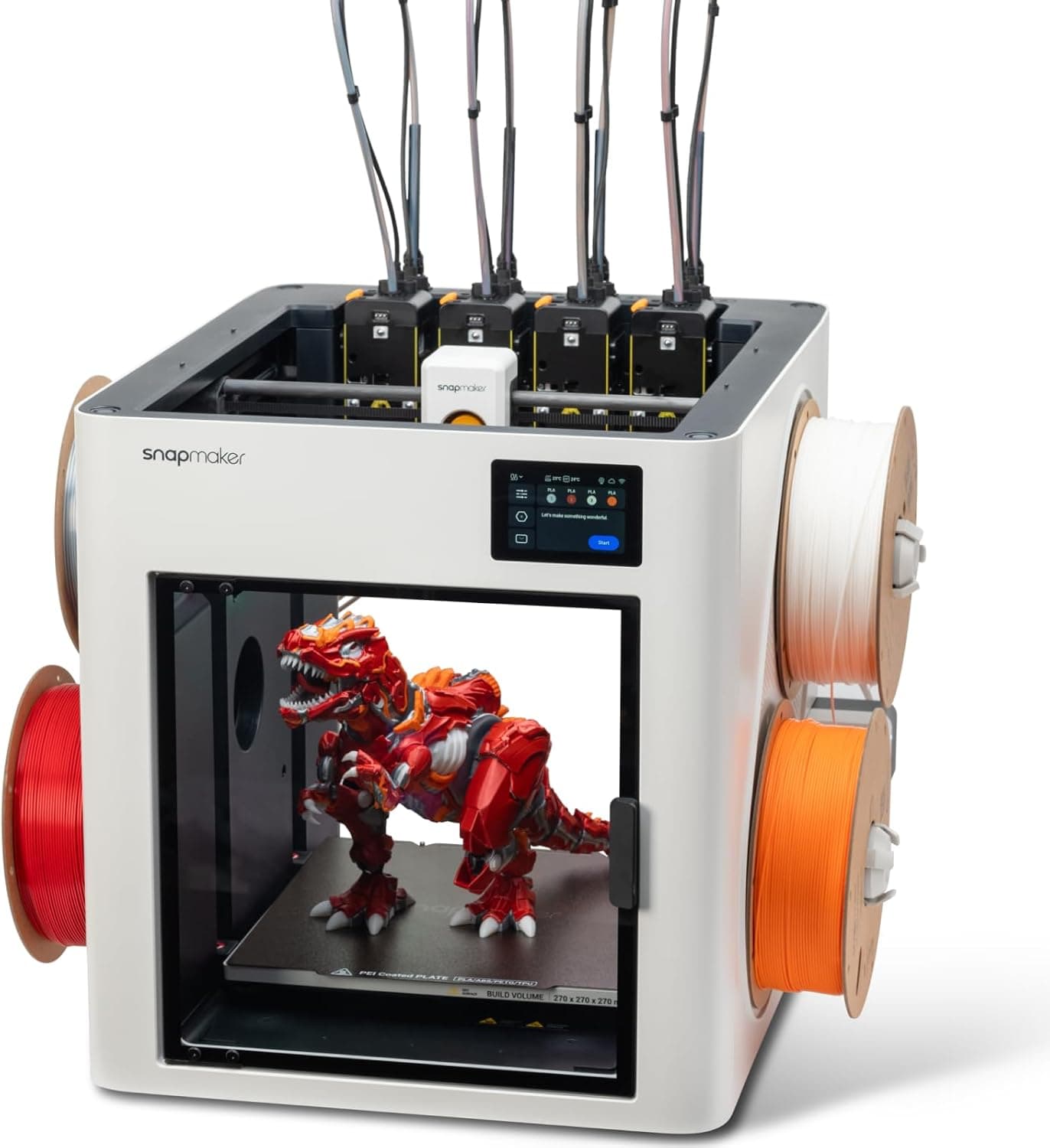
Snapmaker's U1 brings a toolchanger, the multi-color design long reserved for machines like the Prusa XL, into this price range. Instead of swapping filament through one shared nozzle, it parks four independent toolheads and picks up the one it needs, so a color change wastes almost no filament. Tom's Hardware timed its tool swaps at about 12 seconds and named it the best toolchanger multicolor printer of 2026. It is a CoreXY machine with a 270 mm cube build volume, the largest here, plus Klipper firmware, OrcaSlicer support, RFID filament recognition and hands-free calibration. Its limits are a four-color ceiling and an open top: ABS and ASA need the optional top cover.
We may earn a commission when you buy through our links.
Our Verdict
The most advanced multi-color mechanism here and the only toolchanger: four independent toolheads mean a color change is a tool swap rather than a purge, so multi-color prints waste a fraction of the filament the single-nozzle systems burn, and Tom's Hardware timed swaps at about 12 seconds. Unlike the X2D, whose second nozzle covers only a second color, it keeps all four colors purge-free. Each head runs its own temperature, which makes PLA with PETG supports and other true multi-material prints practical, and its 270 mm cube is the largest build volume in the list. It ranks third because it tops out at four colors, needs the optional top cover for ABS and ASA, and ships with stainless rather than hardened nozzles. It beats the Elegoo Centauri Carbon 2 Combo on purge waste, swap speed and multi-material flexibility, which outweighs the Elegoo's full enclosure and 350°C nozzle.
Score Breakdown
Pros & Cons
Pros
- •Near-zero purge waste from four dedicated toolheads
- •Tool swaps of about 12 seconds in Tom's Hardware's timing
- •Per-toolhead temperatures for genuine multi-material prints, such as PLA with PETG supports
- •The largest build volume here (270 mm cube), with Klipper firmware, OrcaSlicer and RFID auto-feed
Cons
- •An open top: ABS and ASA need the optional top cover, an extra purchase
- •A hard limit of four colors, with no way to add more spools to a print
- •Stainless-steel nozzles as standard; carbon- and glass-fiber filaments need hardened-steel nozzles bought separately
- •Some setup effort, and 3DNatives saw a recurring app bug that showed the printer offline until it was restarted
Specifications
| Multi-Color System | SnapSwap toolchanger (4 independent toolheads) |
| Max Colors | 4 |
| Toolheads / Nozzles | 4 toolheads, 4 nozzles |
| Filament Drying | No |
| Build Volume | 270 × 270 × 270 mm |
| Max Speed | 500 mm/s |
| Max Nozzle Temp | 300°C (stainless steel) |
| Enclosure / Chamber | Open top; optional top cover for ABS/ASA |
| Weight | 18.2 kg |
| Max Acceleration | 20,000 mm/s² |
| Max Bed Temp | 100°C |
| Max Hotend Flow | 32 mm³/s |
| Dimensions | 584 × 499 × 730 mm |
| Slicer | Snapmaker Orca, OrcaSlicer |
| Firmware | Klipper |
Quick Answers
What is the multi-color system of the Snapmaker U1?
Snapmaker U1 multi-color system: SnapSwap toolchanger (4 independent toolheads).
What is the max colors of the Snapmaker U1?
Snapmaker U1 max colors: 4.
What is the toolheads / nozzles of the Snapmaker U1?
Snapmaker U1 toolheads / nozzles: 4 toolheads, 4 nozzles.
What is the filament drying of the Snapmaker U1?
Snapmaker U1 filament drying: No.
What is the build volume of the Snapmaker U1?
Snapmaker U1 build volume: 270 × 270 × 270 mm.
What is the max speed of the Snapmaker U1?
Snapmaker U1 max speed: 500 mm/s.
What is the max nozzle temp of the Snapmaker U1?
Snapmaker U1 max nozzle temp: 300°C (stainless steel).
What is the enclosure / chamber of the Snapmaker U1?
Snapmaker U1 enclosure / chamber: Open top; optional top cover for ABS/ASA.
Who is the Snapmaker U1 for?
It suits multi-color prints with minimal filament waste, multi-material prints such as PLA with PETG supports, large prints with frequent color changes, tinkerers who like Klipper and OrcaSlicer. It is not the right pick for more than four colors in one print, aBS or ASA without buying the top cover.
Is the Snapmaker U1 worth buying?
Snapmaker's U1 brings a toolchanger, the multi-color design long reserved for machines like the Prusa XL, into this price range. Instead of swapping filament through one shared nozzle, it parks four independent toolheads and picks up the one it needs, so a color change wastes almost no filament. Tom's Hardware timed its tool swaps at about 12 seconds and named it the best toolchanger multicolor printer of 2026. It is a CoreXY machine with a 270 mm cube build volume, the largest here, plus Klipper firmware, OrcaSlicer support, RFID filament recognition and hands-free calibration. Its limits are a four-color ceiling and an open top: ABS and ASA need the optional top cover. It ranks #3 in our Top 5 Multi-Color 3D Printers Under $1,000. The most advanced multi-color mechanism here and the only toolchanger: four independent toolheads mean a color change is a tool swap rather than a purge, so multi-color prints waste a fraction of the filament the single-nozzle systems burn, and Tom's Hardware timed swaps at about 12 seconds. Unlike the X2D, whose second nozzle covers only a second color, it keeps all four colors purge-free. Each head runs its own temperature, which makes PLA with PETG supports and other true multi-material prints practical, and its 270 mm cube is the largest build volume in the list. It ranks third because it tops out at four colors, needs the optional top cover for ABS and ASA, and ships with stainless rather than hardened nozzles. It beats the Elegoo Centauri Carbon 2 Combo on purge waste, swap speed and multi-material flexibility, which outweighs the Elegoo's full enclosure and 350°C nozzle.
Who Is This For?
Best For
- Multi-color prints with minimal filament waste
- Multi-material prints such as PLA with PETG supports
- Large prints with frequent color changes
- Tinkerers who like Klipper and OrcaSlicer
Not For
- More than four colors in one print
- ABS or ASA without buying the top cover
Where to Buy
Appears In
Compare Head-to-Head
Customer Reviews
Alternatives to Consider
Bambu Lab P2S Combo
Bambu Lab
Bambu Lab's late-2025 successor to the P1S, bundled with the second-generation AMS 2 Pro, and the most complete single-nozzle multi-color printer in this list. The AMS 2 Pro feeds four spools through a single hardened-steel nozzle, dries filament while it prints, and expands to 20 colors with extra AMS units. The enclosed CoreXY printer is rated at 600 mm/s and 20,000 mm/s² over a 256 mm cube, and its chamber retains about 50°C for ABS and ASA. Bambu Studio and the MakerWorld model library make multi-color prints the simplest to set up of any printer here. The usual trade-off of a single-nozzle system applies: every color change purges filament and takes far longer than a toolchanger's tool swap.
Bambu Lab X2D Combo
Bambu Lab
Bambu Lab's X2D, launched in April 2026 as the successor to the X1 Carbon, adds a second nozzle to the toolhead, and the Combo bundles it with the AMS 2 Pro. On a two-color or two-material print it alternates nozzles instead of purging, and Domechy measured about 12 g of waste on a two-color print that cost the P2S about 68 g. It is the only printer here with an actively heated chamber (65°C), and it adds a 1,000 mm/s toolhead, a 120°C bed and HEPA plus activated-carbon filtration, which suits ABS, ASA, nylon and polycarbonate. The trade-offs: the AMS 2 Pro feeds only the main nozzle, so the second runs from an external spool or a second AMS, and reviewers found the Bowden-fed auxiliary nozzle slower and more prone to stringing than the main one. It is sold by Bambu Lab's US store, not on Amazon US.
Elegoo Centauri Carbon 2 Combo
Elegoo
Elegoo's Centauri Carbon 2 Combo is the least expensive enclosed multi-color printer in this list. The CANVAS unit mounted on top feeds four spools, with RFID detection and automatic refill, into an enclosed CoreXY printer with a 350°C hardened-steel nozzle, the hottest here, and a 256 mm cube build volume. TechRadar rated it among the cheapest and most reliable multi-filament printers, and Notebookcheck found its PLA and PETG prints clean and consistent once the default first-layer offset was corrected. Amazon currently sells it bundled with 4 kg of Elegoo Rapid PETG. Its limits are a four-color ceiling and no filament drying. Do not confuse it with the cheaper, open-frame Centauri 2 Combo.
Bambu Lab A1 Combo
Bambu Lab
Bambu Lab's A1 Combo pairs the A1 bed-slinger printer with the four-spool AMS lite, and it remains the simplest and cheapest way into multi-color printing. Full-auto calibration and Bambu Studio's paint tools mean almost no tuning, and Tom's Hardware's reviewer named AMS lite their favorite multicolor system for its simplicity and reliability. It prints at up to 500 mm/s over a 256 mm cube, but its open frame suits PLA, PETG and TPU rather than ABS or ASA, and AMS lite cannot chain beyond four colors or dry spools. Amazon sells it bundled with Bambu Lab's LED Lamp Kit; Bambu Lab's own store sells the plain A1 Combo.