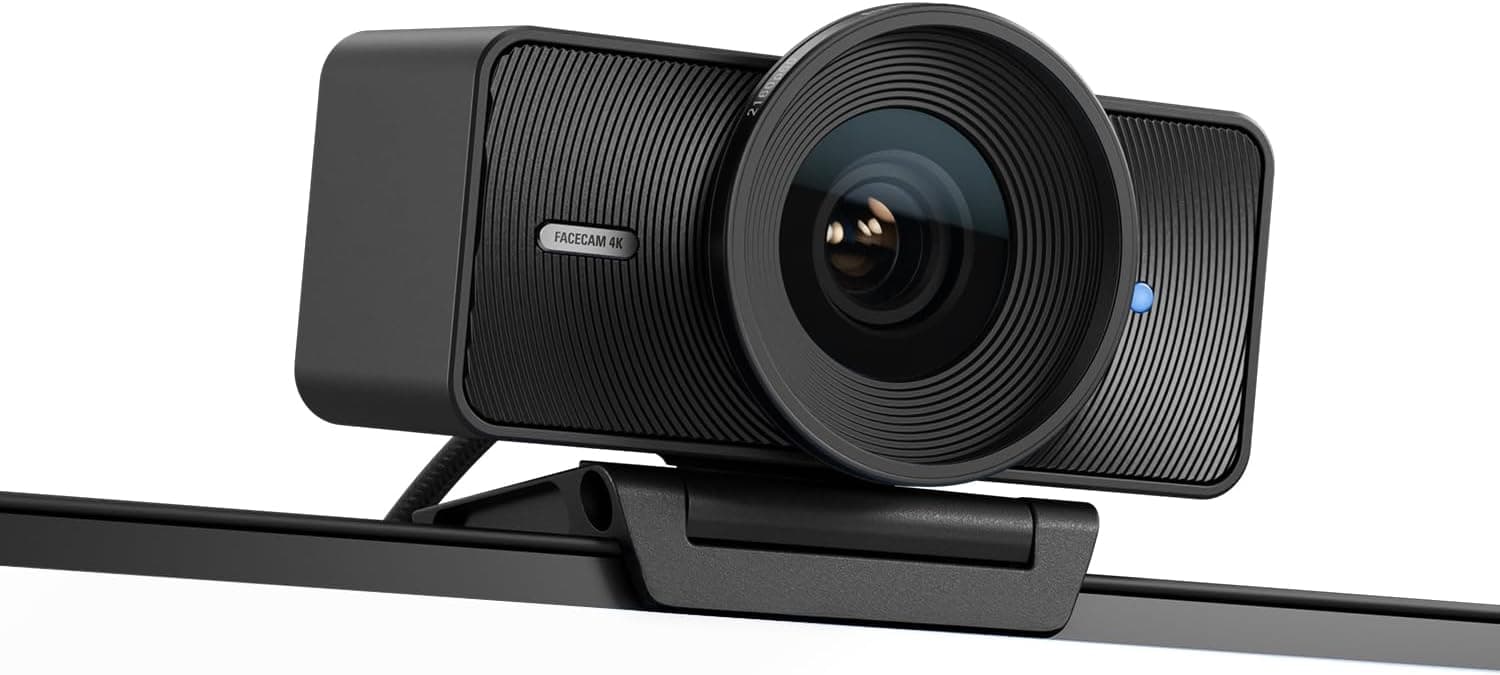
Elgato Facecam 4K
Elgato's current 4K60 webcam, which takes the Facecam Pro's place in this ranking at a lower price. It records 4K at 60fps from a 1/1.8-inch Sony STARVIS 2 sensor, adds HDR up to 4K30, and has a 49mm filter thread (Elgato bills it as the first webcam with one), so creators can fit ND or diffusion filters. Camera Hub exposes DSLR-style manual controls and saves them to onboard memory. The trade-offs are optical: a narrow f/4.0 aperture and a fixed-focus lens mean it wants good lighting, and reviewers describe low-light noise as its main weakness.
We may earn a commission when you buy through our links.
Our Verdict
The pick for 4K at 60fps, which neither the Razer Kiyo Pro Ultra nor the Insta360 Link 2C offers (both top out at 4K30). A 1/1.8-inch STARVIS 2 sensor, HDR up to 4K30, a 49mm filter thread and DSLR-style Camera Hub controls give lit setups the sharpest, smoothest image here for about $180. It ranks below the Kiyo and Link because its f/4.0 aperture is noisy in dim rooms and its fixed-focus lens cannot track or refocus for close-up shots, the two areas this list weights most after raw video quality.
Score Breakdown
Pros & Cons
Pros
- •4K at 60fps, plus HDR up to 4K30
- •1/1.8-inch Sony STARVIS 2 sensor
- •49mm filter thread for ND, polarizing or diffusion filters
- •DSLR-style manual controls in Camera Hub, saved to onboard memory
- •Compact 112g body at a mid-range price
Cons
- •Narrow f/4.0 aperture: grainy or soft in dim rooms without key lighting
- •Fixed focus (30–120 cm at 4K), so close-up product shots soften
- •No built-in microphone
- •Wide 90° view shows more of the room, with no optical background blur
Specifications
| Resolution | 4K @ 60fps (HDR up to 4K30) |
| Field of View | 90° |
| Sensor | 1/1.8" Sony STARVIS 2 |
| Aperture | f/4.0 |
| Autofocus | Fixed focus (30–120 cm at 4K) |
| Connection | USB-C (USB 3.0) |
| Weight | 112g |
Quick Answers
What is the resolution of the Elgato Facecam 4K?
Elgato Facecam 4K resolution: 4K @ 60fps (HDR up to 4K30).
What is the field of view of the Elgato Facecam 4K?
Elgato Facecam 4K field of view: 90°.
What is the sensor of the Elgato Facecam 4K?
Elgato Facecam 4K sensor: 1/1.8" Sony STARVIS 2.
What is the aperture of the Elgato Facecam 4K?
Elgato Facecam 4K aperture: f/4.0.
What is the autofocus of the Elgato Facecam 4K?
Elgato Facecam 4K autofocus: Fixed focus (30–120 cm at 4K).
What is the connection of the Elgato Facecam 4K?
Elgato Facecam 4K connection: USB-C (USB 3.0).
What is the weight of the Elgato Facecam 4K?
Elgato Facecam 4K weight: 112g.
Who is the Elgato Facecam 4K for?
It suits streamers with a lit setup who want 4K60, creators who want filter-thread and manual image control, elgato Stream Deck and Camera Hub users. It is not the right pick for dim rooms without key lighting, product demos that need close-range autofocus, users who want a built-in microphone.
Is the Elgato Facecam 4K worth buying?
Elgato's current 4K60 webcam, which takes the Facecam Pro's place in this ranking at a lower price. It records 4K at 60fps from a 1/1.8-inch Sony STARVIS 2 sensor, adds HDR up to 4K30, and has a 49mm filter thread (Elgato bills it as the first webcam with one), so creators can fit ND or diffusion filters. Camera Hub exposes DSLR-style manual controls and saves them to onboard memory. The trade-offs are optical: a narrow f/4.0 aperture and a fixed-focus lens mean it wants good lighting, and reviewers describe low-light noise as its main weakness. It ranks #3 in our Top 5 Streaming Webcams. The pick for 4K at 60fps, which neither the Razer Kiyo Pro Ultra nor the Insta360 Link 2C offers (both top out at 4K30). A 1/1.8-inch STARVIS 2 sensor, HDR up to 4K30, a 49mm filter thread and DSLR-style Camera Hub controls give lit setups the sharpest, smoothest image here for about $180. It ranks below the Kiyo and Link because its f/4.0 aperture is noisy in dim rooms and its fixed-focus lens cannot track or refocus for close-up shots, the two areas this list weights most after raw video quality.
Who Is This For?
Best For
- Streamers with a lit setup who want 4K60
- Creators who want filter-thread and manual image control
- Elgato Stream Deck and Camera Hub users
Not For
- Dim rooms without key lighting
- Product demos that need close-range autofocus
- Users who want a built-in microphone
Where to Buy
Appears In
Compare Head-to-Head
Customer Reviews
Alternatives to Consider
Elgato Facecam Pro
Elgato
The first true 4K60 webcam, built around a Sony STARVIS CMOS sensor with a 90-degree field of view, an f/2.0 aperture, variable focus and DSLR-style manual controls. Amazon US no longer sells it, and it has been replaced in this ranking by the Elgato Facecam 4K, the brand's current 4K60 webcam.
Razer Kiyo Pro Ultra
Razer
Featuring the largest sensor ever put in a webcam (a massive 1/1.2-inch Sony STARVIS 2), the Razer Kiyo Pro Ultra delivers DSLR-like shallow depth of field and exceptional low-light performance through its wide f/1.7 aperture. The result is a cinematic, bokeh-rich image that makes streamers look like they're broadcasting from a professional studio.
Insta360 Link 2C
Insta360
The Insta360 Link 2C packs AI-powered auto-framing, gesture control, and a 1/2-inch Sony sensor into an incredibly compact body weighing just 46.5 grams. Smart modes like DeskView and Whiteboard make it equally useful for streaming product reviews, tutorials, and traditional face-cam content.
Logitech StreamCam
Logitech
The Logitech StreamCam delivers reliable 1080p60 output, AI-enabled facial tracking, and a unique ability to rotate into portrait orientation for vertical content. Its glass lens, smart auto-focus, and built-in stereo microphones make it a dependable mid-range workhorse that just works out of the box.