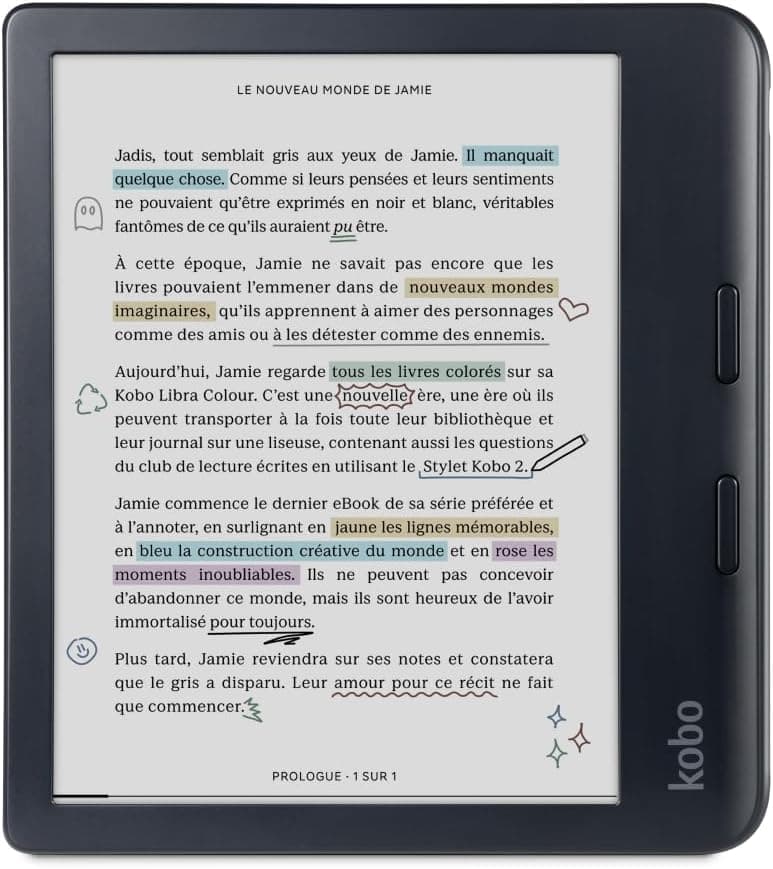
Kobo Libra Colour
The only color e-ink option built for physical page-turn buttons rather than a touchscreen-only design, making it the pick for comics, manga, and picture books that need to render in color.
We may earn a commission when you buy through our links.
Our Verdict
Physical page-turn buttons and a Kaleido 3 color display make this the pick for kids reading comics, manga, or picture books, though it costs more than every Kindle except the Colorsoft Kids and has no kid-specific content filtering.
Score Breakdown
Pros & Cons
Pros
- •E Ink Kaleido 3 color display renders comic covers, manga, and picture books in muted color rather than grayscale
- •Physical page-turn buttons are easier for smaller hands than swiping a touchscreen
- •OverDrive/Libby library lending built in, same as the Clara BW
- •Fully waterproof and compatible with the Kobo Stylus 2 for note-taking
Cons
- •Most expensive e-ink reader on this list at $258
- •Color E Ink is noticeably dimmer and less saturated than a tablet screen, and there are no kids' parental controls
Specifications
| Display | 7" glare-free E Ink Kaleido 3 color, 300 ppi (150 ppi color) |
| Storage | 32GB |
| Battery Life | Up to 6 weeks |
| Water Resistance | IPX8 waterproof |
| Weight | 199.5g |
| Includes | USB-C cable (no cover included) |
Quick Answers
What is the display of the Kobo Libra Colour?
Kobo Libra Colour display: 7" glare-free E Ink Kaleido 3 color, 300 ppi (150 ppi color).
What is the storage of the Kobo Libra Colour?
Kobo Libra Colour storage: 32GB.
What is the battery life of the Kobo Libra Colour?
Kobo Libra Colour battery life: Up to 6 weeks.
What is the water resistance of the Kobo Libra Colour?
Kobo Libra Colour water resistance: IPX8 waterproof.
What is the weight of the Kobo Libra Colour?
Kobo Libra Colour weight: 199.5g.
What is the includes of the Kobo Libra Colour?
Kobo Libra Colour includes: USB-C cable (no cover included).
Who is the Kobo Libra Colour for?
It suits kids who mainly read comics, manga, or illustrated books, families who want physical page-turn buttons over a touchscreen, library-lending households wanting color covers. It is not the right pick for budget-focused buyers, parents wanting built-in content filtering.
Is the Kobo Libra Colour worth buying?
The only color e-ink option built for physical page-turn buttons rather than a touchscreen-only design, making it the pick for comics, manga, and picture books that need to render in color. It ranks #4 in our Top 5 E-Readers for Kids. Physical page-turn buttons and a Kaleido 3 color display make this the pick for kids reading comics, manga, or picture books, though it costs more than every Kindle except the Colorsoft Kids and has no kid-specific content filtering.
Who Is This For?
Best For
- Kids who mainly read comics, manga, or illustrated books
- Families who want physical page-turn buttons over a touchscreen
- Library-lending households wanting color covers
Not For
- Budget-focused buyers
- Parents wanting built-in content filtering
Where to Buy
Appears In
Compare Head-to-Head
Customer Reviews
Alternatives to Consider
Amazon Kindle Paperwhite Kids (16GB)
Amazon
The waterproof, glare-free Paperwhite hardware paired with a kid-friendly cover and Amazon Kids+ access. It's the pick most reviewers land on first for kids who read anywhere from the bath to the beach.
Kobo Clara BW
Kobo
An open, subscription-free e-reader that borrows books directly from the public library via OverDrive/Libby. It's the strongest value pick for families who don't want to pay for a content subscription.
Amazon Kindle Kids (2024, 16GB)
Amazon
The same entry-level Kindle hardware as the adult version, bundled with a protective case, ad-free experience, and Kids+ access at the lowest price of any device on this list.
Amazon Kindle Colorsoft Kids (16GB)
Amazon
The first color Kindle built for kids, pairing a soft color E Ink display with the full Amazon Kids+ parental control suite. It's the premium pick for families who want color book covers and illustrations without giving up Kindle's kid-safe ecosystem.