Kobo Libra Colour vs Amazon Kindle Colorsoft Kids (16GB)
Two color e-ink readers for comics and picture books: an open library-lending device with page-turn buttons against Amazon's first color Kindle built specifically for kids.
We may earn a commission when you buy through our links.
TopsFive comparison scores
Side by side
| Kobo Libra Colour | Amazon Kindle Colorsoft Kids (16GB) | |
|---|---|---|
| Display | 7" glare-free E Ink Kaleido 3 color, 300 ppi (150 ppi color) | 7" Colorsoft E Ink, 300 ppi B&W / 150 ppi color |
| Storage | 32GB | 16GB |
| Battery Life | Up to 6 weeks | Up to 8 weeks |
| Water Resistance | IPX8 waterproof | IPX8 waterproof |
| Weight | 199.5g | 215g |
| Includes | USB-C cable (no cover included) | Kid-friendly cover, 12 months Amazon Kids+, 2-year warranty |
| Price | Check price → | Check price → |
How they differ in real use
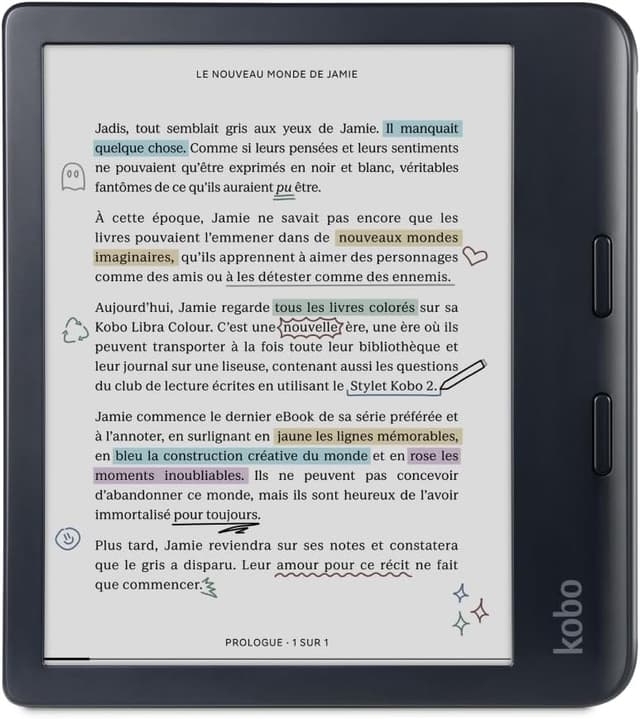
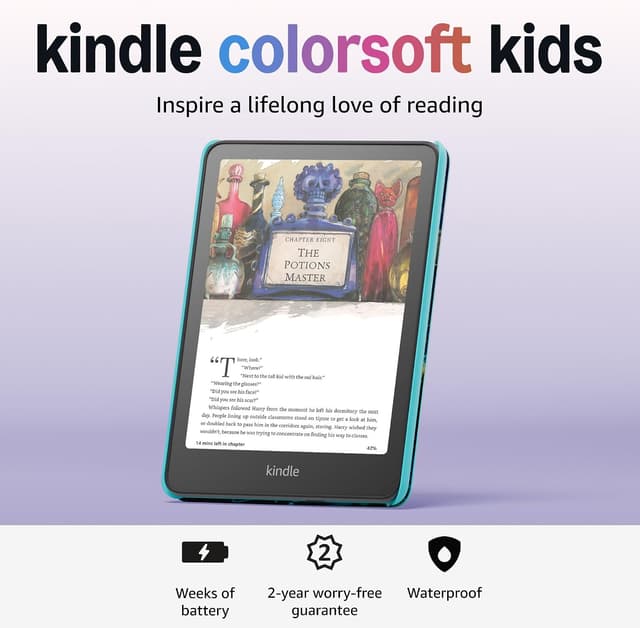
Both bring color E Ink to young readers, but they're built for different households. The Kobo Libra Colour is a general-purpose device that happens to work well for kids: its Kaleido 3 display renders comic covers and manga pages in muted color, it has physical page-turn buttons that are easier for smaller hands than swiping a touchscreen, and it borrows library ebooks for free via OverDrive/Libby, but it has no kids' mode, no content filtering, and no way to cap reading time remotely. The Kindle Colorsoft Kids is the opposite: it's the first color Kindle built specifically for children, bundling the same Colorsoft display technology with Amazon's full Kids+ parental control suite, a kid-friendly cover, and a 2-year worry-free warranty. It also sits at a similar price to the Libra Colour, essentially a wash, but the Libra Colour's 32GB of storage doubles the Colorsoft Kids' 16GB. The deciding factor for most families won't be the display: both render color similarly. It'll be whether you want Amazon's dashboard or Kobo's library-first, hands-off approach.
Kobo Libra Colour
- E Ink Kaleido 3 color display renders comic covers, manga, and picture books in muted color rather than grayscale
- Physical page-turn buttons are easier for smaller hands than swiping a touchscreen
- OverDrive/Libby library lending built in, same as the Clara BW
- Fully waterproof and compatible with the Kobo Stylus 2 for note-taking
- Most expensive e-ink reader on this list at $258
- Color E Ink is noticeably dimmer and less saturated than a tablet screen, and there are no kids' parental controls
Amazon Kindle Colorsoft Kids (16GB)
- First color Kindle designed specifically for kids, with color book covers and illustrations
- Full Amazon Kids+ parental control suite: time limits, reading goals, content filters, Parent Dashboard
- Waterproof design with kid-friendly cover and 2-year worry-free warranty
- Up to 8 weeks of battery life
- Most expensive Kindle on this list at $269.99
- Color E Ink contrast is softer than black-and-white Kindles, so black text isn't as crisp as the Paperwhite Kids
Which should you buy?
Pick the Kindle Colorsoft Kids if you want color illustrations plus the full Amazon Kids+ dashboard for screen-time limits and content filtering; it's the more complete kids' package. Pick the Kobo Libra Colour if your child already reads a lot of library-borrowed comics or manga and you'd rather have physical page-turn buttons and double the storage than a managed parental-control system.
Choose the Kobo Libra Colour if
- Kids who mainly read comics, manga, or illustrated books
- Families who want physical page-turn buttons over a touchscreen
- Library-lending households wanting color covers
Skip it if
- Budget-focused buyers
- Parents wanting built-in content filtering
Choose the Amazon Kindle Colorsoft Kids (16GB) if
- Families wanting color illustrations plus full Kids+ parental controls
- Kids transitioning from picture books to early readers
- Households already invested in the Kindle Kids+ ecosystem
Skip it if
- Budget-focused buyers
- Readers who only read black-and-white novels (the Paperwhite Kids is cheaper and just as good for text)
Common questions
Which has better color quality, the Libra Colour or Colorsoft Kids?
Both use similar E Ink color technology (150 ppi color, 300 ppi black-and-white) and render comparably muted, newsprint-like color; neither is dramatically sharper than the other.
Does the Kobo Libra Colour have parental controls?
No, it's a general-purpose Kobo device with no kids' mode, age filtering, or screen-time limits. The Kindle Colorsoft Kids is the pick if built-in parental controls matter to you.
Is the extra storage on the Libra Colour worth it?
For comics and manga, which have much larger file sizes than text-only books, the Libra Colour's 32GB can matter more than it would for a typical chapter-book reader; the Colorsoft Kids' 16GB is still plenty for most kids' libraries otherwise.