LG UltraGear 27GR83Q-B vs Samsung Odyssey G4 (G40B)
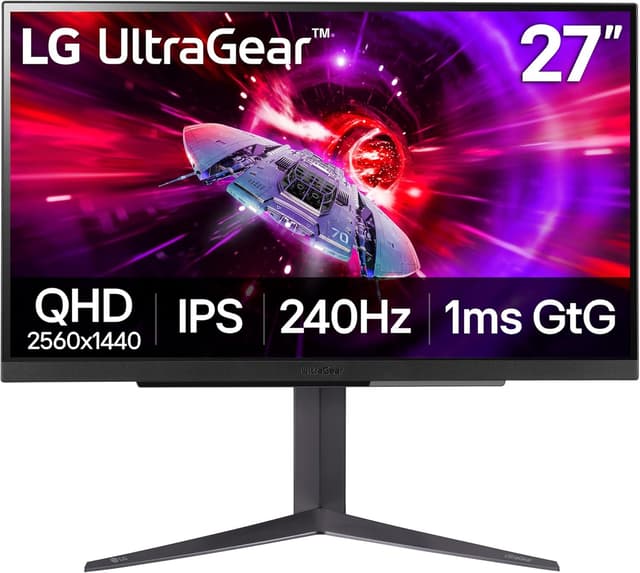
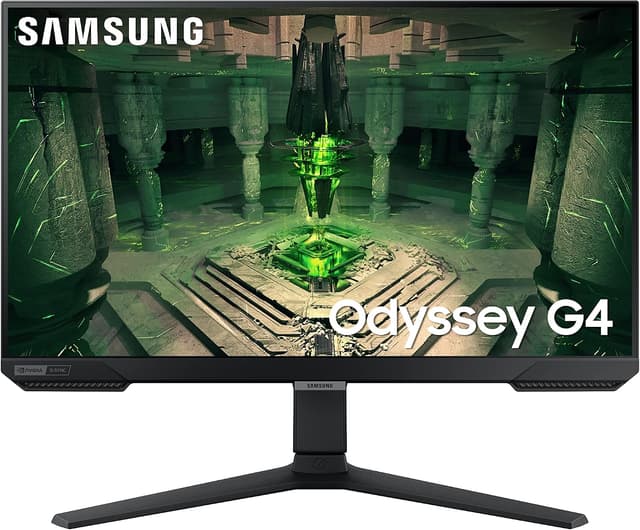
LG UltraGear 27GR83Q-B (#3) vs Samsung Odyssey G4 (G40B) (#4): in our Gaming Monitors for Competitive FPS Under $300 scoring the LG UltraGear 27GR83Q-B totals 8.6/10 and the Samsung Odyssey G4 (G40B) 8.3/10.
We may earn a commission when you buy through our links.
TopsFive comparison scores
Side by side
| LG UltraGear 27GR83Q-B | Samsung Odyssey G4 (G40B) | |
|---|---|---|
| Screen Size | 27" | 25" |
| Resolution | 2560x1440 | 1920x1080 |
| Refresh Rate | 240Hz | 240Hz |
| Panel | IPS | IPS |
| Response Time | 1ms GtG | 1ms GtG |
| Adaptive Sync | FreeSync Premium, G-Sync Compatible | FreeSync Premium, G-Sync Compatible |
| Stand | Height / tilt / pivot | Height / tilt / swivel / pivot |
| HDR | DisplayHDR 400 | — |
| Color Gamut | 95% DCI-P3 | — |
| Inputs | 2x HDMI 2.1, 1x DisplayPort 1.4 | — |
| Price | Check price → | Check price → |
How they differ in real use
Built from our competitive fps monitors under 300 scoring, each product's published specifications, and verified owner feedback — not hands-on testing.
Both the LG UltraGear 27GR83Q-B and the Samsung Odyssey G4 (G40B) made our Top 5 Gaming Monitors for Competitive FPS Under $300, at #3 and #4. Matches the Acer above it on core gaming specs (a 27" 1440p IPS at 240Hz with a rated 1ms GtG response) and adds a more complete feature set: two HDMI 2.1 inputs that carry 240Hz and VRR, official FreeSync Premium and G-Sync Compatible certification, a 95% DCI-P3 gamut and a height- and pivot-adjustable stand. Display Ninja and Monitornerds report input lag of about 3ms at 240Hz. It costs more than the Acer and LG lists no strobing mode to match Acer's 0.5ms VRB, which keeps it third; its 1440p panel is what puts it ahead of the 1080p Samsung and Dell. A focused 25" 1080p 240Hz IPS competitive monitor with a 1ms GtG response, dual G-Sync Compatible and FreeSync Premium support, and a fully adjustable stand that rivals at this price usually skip. The smaller screen suits players who want the whole picture in their field of view, but 1080p and no 1440p option hold it below the QHD picks.
We score gaming monitors for competitive fps under $300 on Motion Clarity (30%), Refresh Rate (25%), Input Lag (15%), Panel & Resolution (15%) and Value (15%). On that basis the LG UltraGear 27GR83Q-B totals 8.6 out of 10 and the Samsung Odyssey G4 (G40B) 8.3. The widest gap is Panel & Resolution, where the LG UltraGear 27GR83Q-B scores 9.3 against 7.6 for the Samsung Odyssey G4 (G40B): panel quality, resolution, and color. Motion Clarity also separates them: 8.4 for the LG UltraGear 27GR83Q-B versus 8.2 for the Samsung Odyssey G4 (G40B). The Samsung Odyssey G4 (G40B) claws back ground on Value.
On paper, the specifications that actually differ: Screen Size: 27" on the LG UltraGear 27GR83Q-B versus 25" on the Samsung Odyssey G4 (G40B); Resolution: 2560x1440 on the LG UltraGear 27GR83Q-B versus 1920x1080 on the Samsung Odyssey G4 (G40B); Stand: Height / tilt / pivot on the LG UltraGear 27GR83Q-B versus Height / tilt / swivel / pivot on the Samsung Odyssey G4 (G40B). They match on Refresh Rate, Panel, Response Time and Adaptive Sync.
Check current pricing at the merchant links below. Owners praise the LG UltraGear 27GR83Q-B for 27" 1440p IPS at 240Hz with about 3ms input lag reported by independent reviewers and two HDMI 2.1 inputs that carry 240Hz and VRR, plus DisplayPort 1.4; the most common complaint is low (about 1,000:1) IPS contrast makes blacks look gray in a dark room. Owners praise the Samsung Odyssey G4 (G40B) for 240Hz IPS with 1ms GtG response and fully adjustable stand (height / tilt / swivel / pivot); the most common complaint is 1080p only, no 1440p sharpness.
LG UltraGear 27GR83Q-B
- 27" 1440p IPS at 240Hz with about 3ms input lag reported by independent reviewers
- Two HDMI 2.1 inputs that carry 240Hz and VRR, plus DisplayPort 1.4
- Official FreeSync Premium and G-Sync Compatible certification
- Wide 95% DCI-P3 color gamut
- Low (about 1,000:1) IPS contrast makes blacks look gray in a dark room
- DisplayHDR 400 without local dimming adds little
- The fastest overdrive setting overshoots, so 'Fast' is the usable mode
Samsung Odyssey G4 (G40B)
- 240Hz IPS with 1ms GtG response
- Fully adjustable stand (height / tilt / swivel / pivot)
- G-Sync Compatible and FreeSync Premium
- 25" keeps 1080p pixel density reasonable
- 1080p only, no 1440p sharpness
- HDR10 is entry-level with no local dimming
- No USB hub
Which should you buy?
The LG UltraGear 27GR83Q-B is the better fit for competitive players who want 1440p sharpness at 240Hz and PC and console players who need HDMI 2.1 inputs; it is the higher-scoring pick here, chiefly for Panel & Resolution and Motion Clarity. The Samsung Odyssey G4 (G40B) is the better fit for competitive players who prefer a smaller 25" screen and anyone who wants an ergonomic stand at a budget price, and the stronger choice if Value matters more to you than the overall score. The LG UltraGear 27GR83Q-B is a poor fit for dark-room players who want deep blacks; the Samsung Odyssey G4 (G40B) is a poor fit for buyers who want 1440p or 27"+.
Choose the LG UltraGear 27GR83Q-B if
- Competitive players who want 1440p sharpness at 240Hz
- PC and console players who need HDMI 2.1 inputs
- Users who want a height- and pivot-adjustable stand
Skip it if
- Dark-room players who want deep blacks
- HDR content viewers
Choose the Samsung Odyssey G4 (G40B) if
- Competitive players who prefer a smaller 25" screen
- Anyone who wants an ergonomic stand at a budget price
- 1080p esports at high frame rates
Skip it if
- Buyers who want 1440p or 27"+
- HDR content viewers
Common questions
Is the LG UltraGear 27GR83Q-B better than the Samsung Odyssey G4 (G40B)?
In our Gaming Monitors for Competitive FPS Under $300 ranking the LG UltraGear 27GR83Q-B scores higher overall, 8.6 to 8.3, with the biggest advantage in Panel & Resolution. The Samsung Odyssey G4 (G40B) is stronger on Value, so it is the better pick if that matters most to you.
What is the main difference between the LG UltraGear 27GR83Q-B and the Samsung Odyssey G4 (G40B)?
The headline spec difference is Screen Size: 27" on the LG UltraGear 27GR83Q-B versus 25" on the Samsung Odyssey G4 (G40B). In use, the gap that matters most is Panel & Resolution (9.3 vs 7.6 in our scoring): panel quality, resolution, and color.