BOOX Note Air5 C vs BOOX Go 10.3 (Gen II)
BOOX Note Air5 C (#2) vs BOOX Go 10.3 (Gen II) (#4, best value): in our E-Ink Tablets for College Students scoring the BOOX Note Air5 C totals 8.5/10 and the BOOX Go 10.3 (Gen II) 8.3/10.
We may earn a commission when you buy through our links.
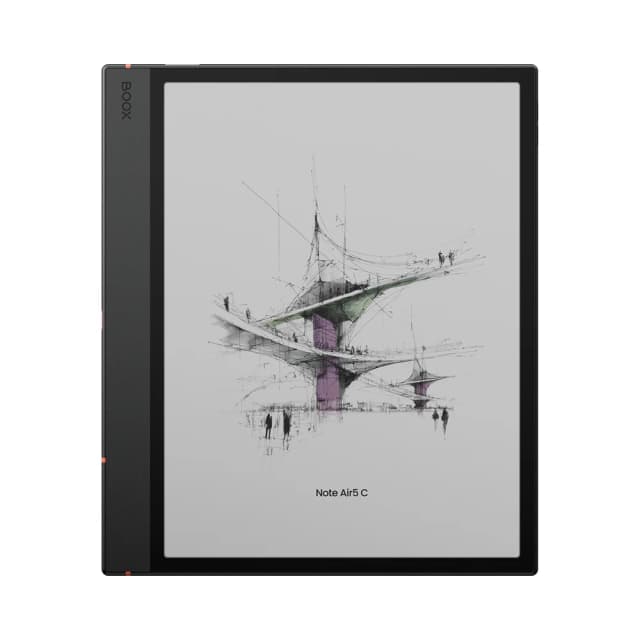
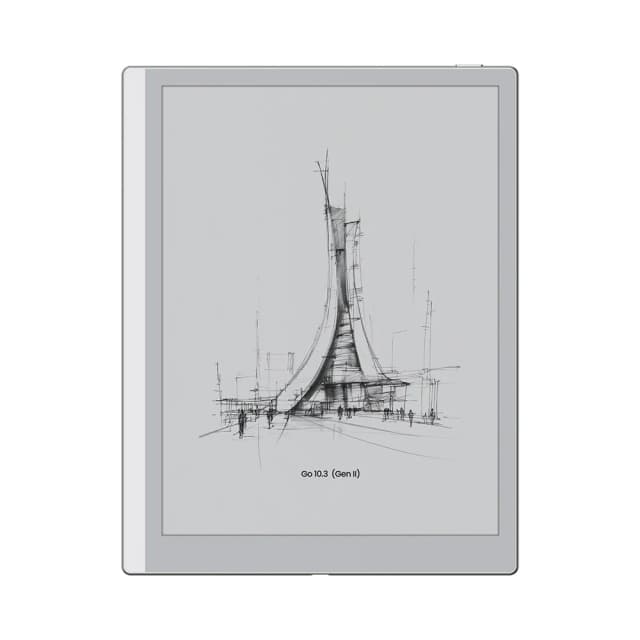
TopsFive comparison scores
Side by side
| BOOX Note Air5 C | BOOX Go 10.3 (Gen II) | |
|---|---|---|
| Screen | 10.3" Kaleido 3 E Ink, 300 ppi B&W / 150 ppi color | 10.3" E Ink, 300 ppi |
| Color | Yes (Kaleido 3) | No (monochrome) |
| Front Light | Yes, warm and cold | No (Lumi version adds one) |
| Storage | 64GB + microSD, 6GB RAM | 64GB |
| Weight | About 430-440 g, 5.8 mm thin | About 350-360 g |
| Battery Life | 3,700 mAh; reviewers report a few days to about a week | 3,700 mAh; reviewers report several days to about a week |
| Stylus | BOOX Pen3 included | InkSense Plus active stylus, USB-C rechargeable |
| Software & Apps | Android 15 with Google Play Store | Android 15 with Google Play Store |
| Price | Check price → | Check price → |
How they differ in real use
Built from our e ink tablets for college students scoring, each product's published specifications, and verified owner feedback — not hands-on testing.
Both the BOOX Note Air5 C and the BOOX Go 10.3 (Gen II) made our Top 5 E-Ink Tablets for College Students, at #2 and #4 (best value). The most flexible pick: Android 15 with Google Play means OneNote, Google Drive, Notion, Libby and the Kindle app all run on a 10.3-inch color E Ink screen, with 64GB plus microSD and an optional keyboard cover for typing. It ranks below the Kindle Scribe (2025) because reviewers report battery life measured in days rather than weeks, it is the heaviest tablet here at about 430-440 g, and its 10.3-inch screen is smaller. It ranks above the Kindle Scribe Colorsoft because it adds color and runs the apps a course actually uses for about $100 less, while the Colorsoft is limited to Kindle software. The cheapest Android E Ink tablet here and the lightest at roughly 350-360 g: Android 15 with Google Play, a 300 ppi 10.3-inch screen and 64GB of storage. It ranks below the Kindle Scribe Colorsoft because it has no front light or color, Tom's Guide found its writing feel weaker than the Scribe's, and its InkSense Plus stylus needs charging. It ranks above the Kindle Scribe without Front Light because, at about $10 less, it adds Android apps and four times the storage (64GB versus 16GB), which matters for PDF textbook libraries, while the Scribe keeps a larger 11-inch screen and a no-charge pen.
We score e-ink tablets for college students on Note-Taking & Pen Feel (25%), PDF & Textbook Reading (20%), Course Apps & Cloud Sync (15%), Battery Life (10%), Portability (10%) and Value for Students (20%). On that basis the BOOX Note Air5 C totals 8.5 out of 10 and the BOOX Go 10.3 (Gen II) 8.3. The widest gap is Note-Taking & Pen Feel, where the BOOX Note Air5 C scores 8.6 against 7.8 for the BOOX Go 10.3 (Gen II): how natural handwriting feels and how capable the notebook software is: pen latency and friction reported by reviewers, whether the stylus needs charging, and tools such as lassoing, search and handwriting conversion. PDF & Textbook Reading also separates them: 9 for the BOOX Note Air5 C versus 8.2 for the BOOX Go 10.3 (Gen II). The BOOX Go 10.3 (Gen II) claws back ground on Portability, Value for Students and Battery Life.
On paper, the specifications that actually differ: Screen: 10.3" Kaleido 3 E Ink, 300 ppi B&W / 150 ppi color on the BOOX Note Air5 C versus 10.3" E Ink, 300 ppi on the BOOX Go 10.3 (Gen II); Color: Yes (Kaleido 3) on the BOOX Note Air5 C versus No (monochrome) on the BOOX Go 10.3 (Gen II); Front Light: Yes, warm and cold on the BOOX Note Air5 C versus No (Lumi version adds one) on the BOOX Go 10.3 (Gen II); Storage: 64GB + microSD, 6GB RAM on the BOOX Note Air5 C versus 64GB on the BOOX Go 10.3 (Gen II); Weight: About 430-440 g, 5.8 mm thin on the BOOX Note Air5 C versus About 350-360 g on the BOOX Go 10.3 (Gen II); Battery Life: 3,700 mAh; reviewers report a few days to about a week on the BOOX Note Air5 C versus 3,700 mAh; reviewers report several days to about a week on the BOOX Go 10.3 (Gen II). They match on Software & Apps.
Check current pricing at the merchant links below. Owners praise the BOOX Note Air5 C for android 15 with Google Play runs OneNote, Google Drive, Notion and other coursework apps alongside BOOX's own notes app and color highlights and diagrams on a Kaleido 3 panel, with warm and cold front light; the most common complaint is reviewers report battery life of days rather than weeks, shorter than the Kindle Scribes. Owners praise the BOOX Go 10.3 (Gen II) for android 15 with Google Play at the lowest price in this list and roughly 350-360 g, the lightest tablet here, easy to carry between classes; the most common complaint is no front light on this version, so dim lecture halls and dorm rooms need room light.
BOOX Note Air5 C
- Android 15 with Google Play runs OneNote, Google Drive, Notion and other coursework apps alongside BOOX's own notes app
- Color highlights and diagrams on a Kaleido 3 panel, with warm and cold front light
- 64GB plus microSD expansion, the most storage flexibility in this list
- Optional magnetic keyboard cover for typing up notes or essays
- Reviewers report battery life of days rather than weeks, shorter than the Kindle Scribes
- Muted colors and 150 ppi color resolution; about 430-440 g makes it the heaviest here
- Android apps can be slow or ghost on E Ink, so app performance varies
BOOX Go 10.3 (Gen II)
- Android 15 with Google Play at the lowest price in this list
- Roughly 350-360 g, the lightest tablet here, easy to carry between classes
- 64GB of storage, four times the Kindle Scribe without front light
- No front light on this version, so dim lecture halls and dorm rooms need room light
- Tom's Guide found its writing feel weaker than the Kindle Scribe's, and app launches slow
- InkSense Plus stylus must be recharged, unlike the EMR pens on the Kindles
Which should you buy?
The BOOX Note Air5 C is the better fit for students who need OneNote, Google Drive or a course app on the tablet itself and color-coded notes, diagrams and highlighted readings; it is the higher-scoring pick here, chiefly for Note-Taking & Pen Feel and PDF & Textbook Reading. The BOOX Go 10.3 (Gen II) is the better fit for students who want Android apps at the lowest price and carrying a tablet all day between classes, and the stronger choice if Portability and Value for Students matter more to you than the overall score. The BOOX Note Air5 C is a poor fit for anyone who wants weeks between charges; the BOOX Go 10.3 (Gen II) is a poor fit for late-night reading without a lamp.
Choose the BOOX Note Air5 C if
- Students who need OneNote, Google Drive or a course app on the tablet itself
- Color-coded notes, diagrams and highlighted readings
- Students who want to add a keyboard for typing
Skip it if
- Anyone who wants weeks between charges
- Students who want the simplest, distraction-free device
Choose the BOOX Go 10.3 (Gen II) if
- Students who want Android apps at the lowest price
- Carrying a tablet all day between classes
- Reading and annotating in well-lit rooms
Skip it if
- Late-night reading without a lamp
- Anyone who wants the best pen feel
Common questions
Is the BOOX Note Air5 C better than the BOOX Go 10.3 (Gen II)?
In our E-Ink Tablets for College Students ranking the BOOX Note Air5 C scores higher overall, 8.5 to 8.3, with the biggest advantage in Note-Taking & Pen Feel. The BOOX Go 10.3 (Gen II) is stronger on Portability and Value for Students, so it is the better pick if those matter most to you.
What is the main difference between the BOOX Note Air5 C and the BOOX Go 10.3 (Gen II)?
The headline spec difference is Screen: 10.3" Kaleido 3 E Ink, 300 ppi B&W / 150 ppi color on the BOOX Note Air5 C versus 10.3" E Ink, 300 ppi on the BOOX Go 10.3 (Gen II). In use, the gap that matters most is Note-Taking & Pen Feel (8.6 vs 7.8 in our scoring): how natural handwriting feels and how capable the notebook software is: pen latency and friction reported by reviewers, whether the stylus needs charging, and tools such as lassoing, search and handwriting conversion.