Bambu Lab A1 vs Creality Ender-3 V3 SE
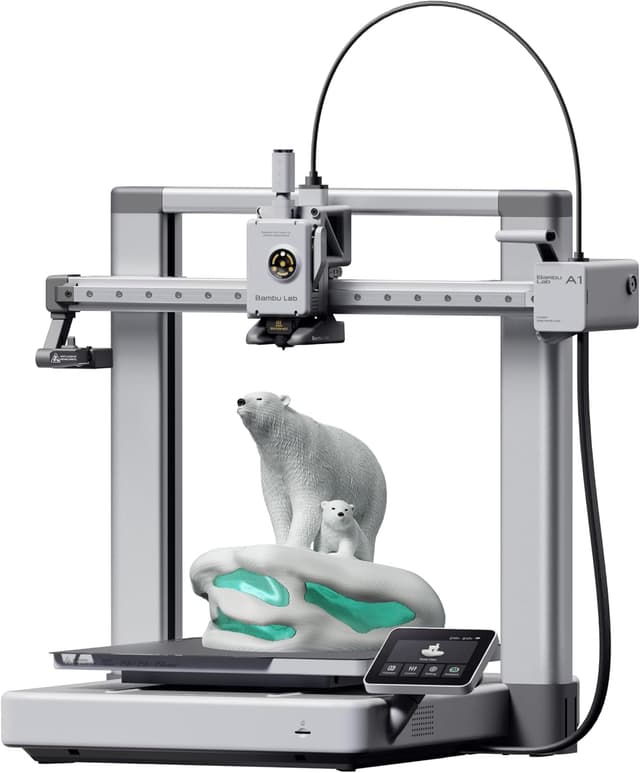
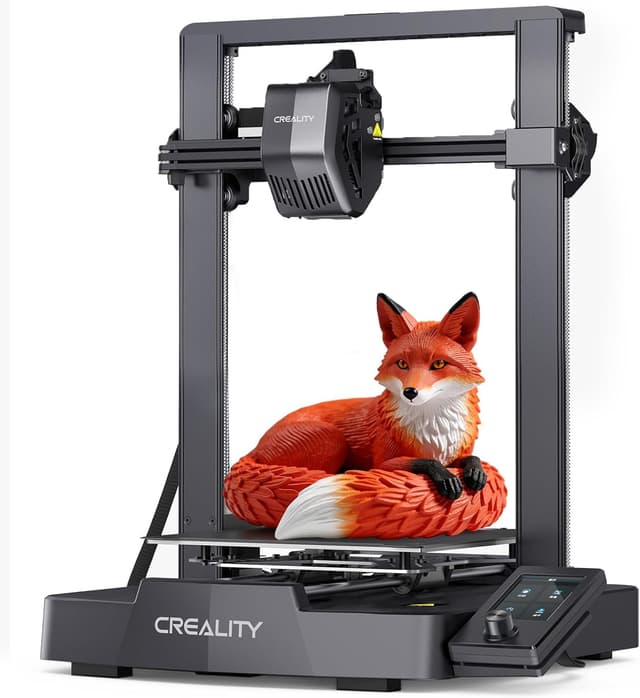
Bambu Lab A1 (#4) vs Creality Ender-3 V3 SE (#5, best budget): in our 3D Printers for Kids scoring the Bambu Lab A1 totals 7.2/10 and the Creality Ender-3 V3 SE 6.1/10, the Bambu Lab A1 leading on Ease of Use for Kids and Print Quality & Reliability and the Creality Ender-3 V3 SE on Value.
We may earn a commission when you buy through our links.
TopsFive comparison scores
Side by side
| Bambu Lab A1 | Creality Ender-3 V3 SE | |
|---|---|---|
| Recommended Age | About 10+ (per 3DPrintGearLab) | Teens (about 12+) |
| Build Volume | 256 × 256 × 256 mm | 220 × 220 × 250 mm |
| Enclosure | Open frame (bed slinger) | Open frame (bed slinger) |
| Setup & Calibration | About 15–20 minutes; full-auto calibration | Partial assembly; CR Touch auto bed leveling |
| How Kids Print | Bambu Handy phone app or touchscreen, MakerWorld model library | Desktop slicer (Creality Print) to microSD card; 3.2-inch dial screen |
| Connectivity | Wi-Fi, microSD | microSD (no Wi-Fi) |
| Max Speed | 500 mm/s | 250 mm/s |
| Filaments | PLA, PETG, TPU | PLA, PETG, TPU |
| Max Bed Temp | 100°C | 100°C |
| Max Nozzle Temp | 300°C | — |
| Noise | Under 48 dB in silent mode | — |
| Upgrade Path | AMS lite for 4-color printing | — |
| Extruder | — | Sprite direct drive |
| Price | Check price → | Check price → |
How they differ in real use
Built from our 3d printers for kids scoring, each product's published specifications, and verified owner feedback — not hands-on testing.
Both the Bambu Lab A1 and the Creality Ender-3 V3 SE made our Top 5 3D Printers for Kids, at #4 and #5 (best budget). The printer to grow into, and 3DPrintGearLab's pick for that role at about age 10 and up: the same full-auto calibration, phone app and under-48 dB silent mode as the A1 mini, but a 256 mm cube (about 2.9 times the mini's volume) and a 100°C bed, so a tween or teen can print helmets, cosplay pieces and school projects in one piece. It ranks below the A1 mini because most children do not need the extra size, and the larger moving bed and footprint make it harder to place and supervise in a child's room. It ranks above the Creality Ender-3 V3 SE because it needs no tinkering, prints from a phone over Wi-Fi and adds four-color printing with an AMS lite, which justifies the extra cost over the Ender. The cheapest way to give a teenager a full-size printer, and the budget teen pick in 3DPrintGearLab's and GeekBitz's guides: a 220 × 220 × 250 mm volume, CR Touch auto bed leveling and a Sprite direct-drive extruder that handles TPU, at the lowest price here. It ranks last because it asks the most of its owner: partial assembly, no Wi-Fi or phone app (prints go from a desktop slicer to a microSD card), a dial-driven 3.2-inch screen and an open frame. Against the Bambu Lab A1 it trades the A1's one-tap workflow and silent mode for a lower price and a more hackable design, which suits a teen who wants to learn how printers work rather than just print.
We score 3d printers for kids on Ease of Use for Kids (25%), Safety (20%), Print Quality & Reliability (20%), Room to Grow (10%), Noise & Home Fit (10%) and Value (15%). On that basis the Bambu Lab A1 totals 7.2 out of 10 and the Creality Ender-3 V3 SE 6.1. The widest gap is Ease of Use for Kids, where the Bambu Lab A1 scores 8 against 5 for the Creality Ender-3 V3 SE: whether a child can start a print alone: setup time, automatic calibration or leveling, and app or touchscreen printing from a ready-made model library instead of a desktop slicer. Print Quality & Reliability also separates them: 9 for the Bambu Lab A1 versus 7 for the Creality Ender-3 V3 SE. The Creality Ender-3 V3 SE claws back ground on Value.
On paper, the specifications that actually differ: Recommended Age: About 10+ (per 3DPrintGearLab) on the Bambu Lab A1 versus Teens (about 12+) on the Creality Ender-3 V3 SE; Build Volume: 256 × 256 × 256 mm on the Bambu Lab A1 versus 220 × 220 × 250 mm on the Creality Ender-3 V3 SE; Setup & Calibration: About 15–20 minutes; full-auto calibration on the Bambu Lab A1 versus Partial assembly; CR Touch auto bed leveling on the Creality Ender-3 V3 SE; How Kids Print: Bambu Handy phone app or touchscreen, MakerWorld model library on the Bambu Lab A1 versus Desktop slicer (Creality Print) to microSD card; 3.2-inch dial screen on the Creality Ender-3 V3 SE; Connectivity: Wi-Fi, microSD on the Bambu Lab A1 versus microSD (no Wi-Fi) on the Creality Ender-3 V3 SE; Max Speed: 500 mm/s on the Bambu Lab A1 versus 250 mm/s on the Creality Ender-3 V3 SE. They match on Enclosure, Filaments and Max Bed Temp.
Check current pricing at the merchant links below. Owners praise the Bambu Lab A1 for 256 mm cube build volume, the largest in this list and same full-auto calibration, Bambu Handy app and MakerWorld library as the A1 mini; the most common complaint is open frame with an exposed hot nozzle and a large moving bed; supervise younger children. Owners praise the Creality Ender-3 V3 SE for the lowest price in this list for a full-size 220 × 220 × 250 mm build volume and CR Touch automatic bed leveling; the most common complaint is no Wi-Fi or phone app: prints go through a desktop slicer and a microSD card.
Bambu Lab A1
- 256 mm cube build volume, the largest in this list
- Same full-auto calibration, Bambu Handy app and MakerWorld library as the A1 mini
- Rated under 48 dB in silent mode
- Adds four-color printing later with an AMS lite
- Open frame with an exposed hot nozzle and a large moving bed; supervise younger children
- Bigger footprint than the A1 mini needs a sturdy, deep desk
- Costs more than the A1 mini for a size a younger child rarely needs
Creality Ender-3 V3 SE
- The lowest price in this list for a full-size 220 × 220 × 250 mm build volume
- CR Touch automatic bed leveling
- Sprite direct-drive extruder prints flexible TPU
- Open, widely modded design with a large owner community for troubleshooting
- No Wi-Fi or phone app: prints go through a desktop slicer and a microSD card
- Requires some assembly and more tinkering than any other pick
- Open frame and a dated dial interface make it a teen printer, not a young child's
Which should you buy?
The Bambu Lab A1 is the better fit for tweens and teens ready for larger prints and cosplay, school and maker projects; it is the higher-scoring pick here, chiefly for Ease of Use for Kids and Print Quality & Reliability. The Creality Ender-3 V3 SE is the better fit for teens who want to learn how a 3D printer works and the tightest budget, and the stronger choice if Value matters more to you than the overall score. The Bambu Lab A1 is a poor fit for small desks; the Creality Ender-3 V3 SE is a poor fit for young children.
Choose the Bambu Lab A1 if
- Tweens and teens ready for larger prints
- Cosplay, school and maker projects
- Families who want one printer for kids and adults
Skip it if
- Small desks
- Young children printing unsupervised
Choose the Creality Ender-3 V3 SE if
- Teens who want to learn how a 3D printer works
- The tightest budget
- Tinkerers who plan to upgrade and mod
Skip it if
- Young children
- Families who want phone-based, one-tap printing
Common questions
Is the Bambu Lab A1 better than the Creality Ender-3 V3 SE?
In our 3D Printers for Kids ranking the Bambu Lab A1 scores higher overall, 7.2 to 6.1, with the biggest advantage in Ease of Use for Kids. The Creality Ender-3 V3 SE is stronger on Value, so it is the better pick if that matters most to you.
What is the main difference between the Bambu Lab A1 and the Creality Ender-3 V3 SE?
The headline spec difference is Recommended Age: About 10+ (per 3DPrintGearLab) on the Bambu Lab A1 versus Teens (about 12+) on the Creality Ender-3 V3 SE. In use, the gap that matters most is Ease of Use for Kids (8 vs 5 in our scoring): whether a child can start a print alone: setup time, automatic calibration or leveling, and app or touchscreen printing from a ready-made model library instead of a desktop slicer.