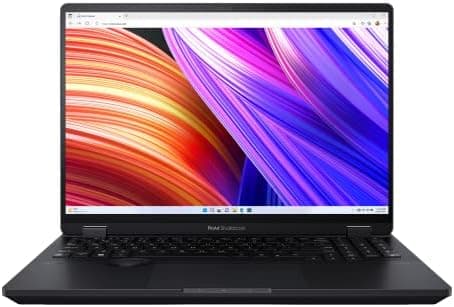
ASUS ProArt Studiobook 16
Built specifically for creators with ASUS Dial and studio-grade OLED display.
Our Verdict
Built specifically for creators with ASUS Dial and studio-grade OLED display.
Pros & Cons
Pros
- •Studio-grade OLED
- •ASUS Dial controller
- •Powerful specs
- •Color-accurate
- •Great for video
Cons
- •Expensive
- •Heavier than competition
- •Bulky charger
Specifications
| OS | Windows 11 |
| Processor | Intel Core i9-13980HX |
| RAM | 32GB - 64GB |
| Storage | 1TB - 2TB SSD |
| GPU | NVIDIA RTX 4070 |
| Display | 16" 4K OLED 3840x2400 |
| Weight | 5.3 lbs |
| Battery | Up to 9 hours |
Quick Answers
What is the OS of the ASUS ProArt Studiobook 16?
ASUS ProArt Studiobook 16 OS: Windows 11.
What is the processor of the ASUS ProArt Studiobook 16?
ASUS ProArt Studiobook 16 processor: Intel Core i9-13980HX.
What is the RAM of the ASUS ProArt Studiobook 16?
ASUS ProArt Studiobook 16 RAM: 32GB - 64GB.
What is the storage of the ASUS ProArt Studiobook 16?
ASUS ProArt Studiobook 16 storage: 1TB - 2TB SSD.
What is the GPU of the ASUS ProArt Studiobook 16?
ASUS ProArt Studiobook 16 GPU: NVIDIA RTX 4070.
What is the display of the ASUS ProArt Studiobook 16?
ASUS ProArt Studiobook 16 display: 16" 4K OLED 3840x2400.
What is the weight of the ASUS ProArt Studiobook 16?
ASUS ProArt Studiobook 16 weight: 5.3 lbs.
What is the battery of the ASUS ProArt Studiobook 16?
ASUS ProArt Studiobook 16 battery: Up to 9 hours.
Who is the ASUS ProArt Studiobook 16 for?
It suits professional video editors, 3D artists, color-critical work. It is not the right pick for budget creatives, portability seekers.
Who Is This For?
Best For
- Professional video editors
- 3D artists
- Color-critical work
Not For
- Budget creatives
- Portability seekers
Where to Buy
Customer Reviews
Alternatives to Consider
MacBook Pro 16 M3 Max
Apple
One of the best creative workstations you can buy right now. The display, performance, and battery life all lead the category.
Dell XPS 15
Dell
Premium Windows laptop with stunning OLED display and powerful specs for creators.
ASUS ProArt P16 (2025)
ASUS
The 2025 ProArt P16 is ASUS's current 16-inch creator laptop and the successor to the ProArt Studiobook 16. It pairs an AMD Ryzen AI 9 HX 370 with an NVIDIA GeForce RTX 5070 and a 4K OLED touchscreen with 100% DCI-P3 coverage and PANTONE validation. This configuration ships with 64GB of memory and a 2TB SSD in a 4.08 lb chassis.
Microsoft Surface Laptop Studio 2
Microsoft
Unique convertible design with pen support. Perfect for illustrators and designers.