Samsung Odyssey G4 (G40B) vs Dell 27 Gaming Monitor SE2726HG
Two budget 240Hz IPS monitors for competitive play, separated by size and stand: spend more on the 25" Samsung Odyssey G4 for a fully adjustable stand and denser 1080p image, or take the 27" Dell SE2726HG for the lowest price on a 240Hz panel if a bigger screen and a tighter budget matter more than ergonomics.
We may earn a commission when you buy through our links.
TopsFive comparison scores
Side by side
| Samsung Odyssey G4 (G40B) | Dell 27 Gaming Monitor SE2726HG | |
|---|---|---|
| Screen Size | 25" | 27" |
| Resolution | 1920x1080 | 1920x1080 |
| Refresh Rate | 240Hz | 240Hz |
| Panel | IPS | IPS |
| Response Time | 1ms GtG | 5ms Normal / 0.5ms Extreme |
| Adaptive Sync | FreeSync Premium, G-Sync Compatible | FreeSync Premium |
| Stand | Height / tilt / swivel / pivot | Tilt only |
| Price | Check price → | Check price → |
How they differ in real use
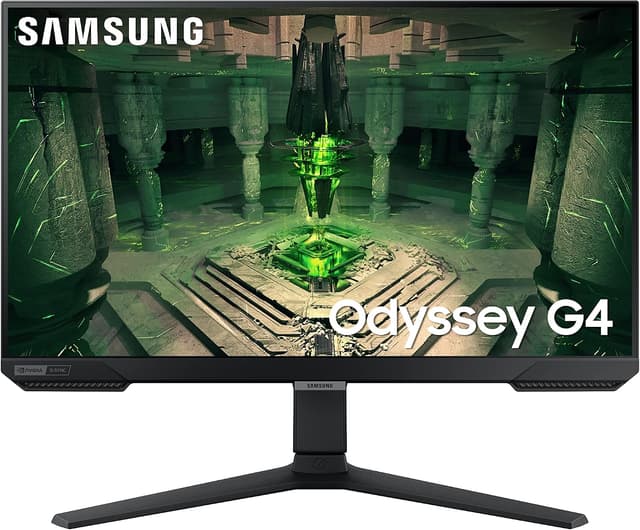
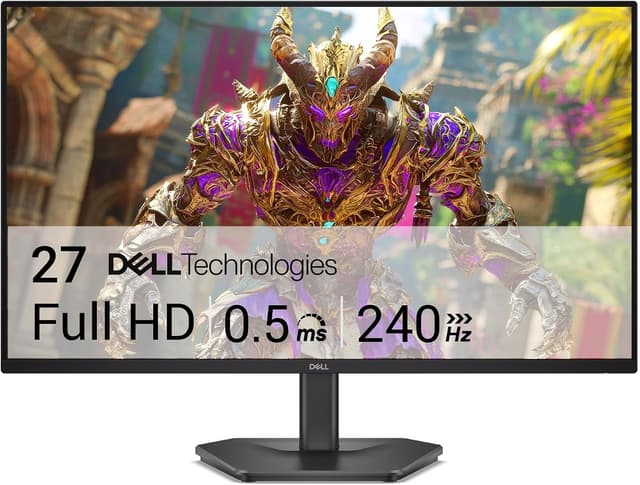
Both monitors share the same competitive foundation (a 240Hz IPS panel at 1920x1080 with FreeSync Premium), so the decision comes down to size, pixel density, stand, and price rather than raw speed. The Samsung Odyssey G4 uses a 25" panel, which spreads 1080p over less area for a sharper roughly 88 ppi image, and it pairs that with the feature budget buyers most often lose: a fully adjustable stand with height, tilt, swivel, and pivot, plus dual G-Sync Compatible and FreeSync Premium certification and an Ultrawide Game View 21:9 crop mode. The Dell SE2726HG stretches 1080p across a larger 27" panel, dropping pixel density to about 81 ppi so text and edges look a little softer up close, and it ships with a tilt-only stand (no height adjustment) to hit its lower price. What the Dell gives back is a bigger screen, a 0.5ms Extreme response mode, 99% sRGB coverage, and Dell's 3-year warranty with Advanced Exchange, all typically for meaningfully less money than the Samsung. Neither has a USB hub, and both are entry-level on HDR, so those are not deciding factors.
Samsung Odyssey G4 (G40B)
- 240Hz IPS with 1ms GtG response
- Fully adjustable stand (height / tilt / swivel / pivot)
- G-Sync Compatible and FreeSync Premium
- 25" keeps 1080p pixel density reasonable
- 1080p only, no 1440p sharpness
- HDR10 is entry-level with no local dimming
- No USB hub
Dell 27 Gaming Monitor SE2726HG
- 240Hz on a 27" IPS panel at a budget price
- FreeSync Premium for tear-free gaming
- 0.5ms response in Extreme mode
- 99% sRGB color coverage
- 27" at 1080p means low pixel density (~81 ppi)
- Tilt-only stand with no height adjustment
- Entry-level overdrive can show overshoot at 240Hz
Which should you buy?
Buy the Samsung Odyssey G4 if you want the more refined package: the 25" size keeps 1080p looking crisp, the fully adjustable stand lets you set a proper competitive eye line without a monitor arm, and dual G-Sync/FreeSync certification is reassuring. Buy the Dell SE2726HG if price and screen size lead your list: it is the cheapest credible way onto a 240Hz IPS panel, the 27" size is easy to live with, and the 3-year warranty is unusually good at this price, provided you can live with a tilt-only stand or already own a VESA arm. Ergonomics and sharpness point to the Samsung; budget and size point to the Dell.
Choose the Samsung Odyssey G4 (G40B) if
- Competitive players who prefer a smaller 25" screen
- Anyone who wants an ergonomic stand at a budget price
- 1080p esports at high frame rates
Skip it if
- Buyers who want 1440p or 27"+
- HDR content viewers
Choose the Dell 27 Gaming Monitor SE2726HG if
- Budget builds that still want 240Hz
- First high-refresh monitor buyers
- Players who value a large 27" screen over pixel density
Skip it if
- Anyone wanting 1440p sharpness
- Users who need height adjustment
Common questions
Is 1080p too soft on the Dell's 27-inch screen?
It is noticeably less sharp than the Samsung, not unusable. Spreading 1080p across 27 inches yields about 81 ppi, so text edges and fine detail look softer up close than the 25" Samsung's roughly 88 ppi. At a normal gaming distance most players adapt quickly, and for fast competitive shooters the lower pixel density is rarely a handicap. If you sit close or do a lot of desktop work, the smaller Samsung (or a 1440p pick from our main list) will look cleaner.
How much does the tilt-only stand on the Dell matter?
It matters if you cannot get the screen to eye level otherwise. The Dell adjusts for tilt but not height, so on a standard desk the panel may sit lower than ideal for a neutral neck posture during long sessions. The Samsung's height, tilt, swivel, and pivot stand solves that out of the box. The Dell is 100x100 VESA compatible, so a cheap monitor arm restores full adjustment; just factor that cost in when comparing prices.
Do both work with an NVIDIA GPU for tear-free gaming?
Yes. Both support FreeSync Premium, which modern NVIDIA cards run through G-Sync Compatible mode, so you get variable refresh either way. The Samsung is additionally certified G-Sync Compatible by NVIDIA, which is a validation step rather than a different technology. In practice both deliver smooth, tear-free 240Hz gaming on current NVIDIA and AMD GPUs.