Lenovo Chromebook Duet Gen 9 vs Samsung Galaxy Chromebook Go
Lenovo Chromebook Duet Gen 9 (#2) vs Samsung Galaxy Chromebook Go (#4): in our Light Use Laptops scoring the Lenovo Chromebook Duet Gen 9 totals 8.6/10 and the Samsung Galaxy Chromebook Go 8.3/10.
We may earn a commission when you buy through our links.
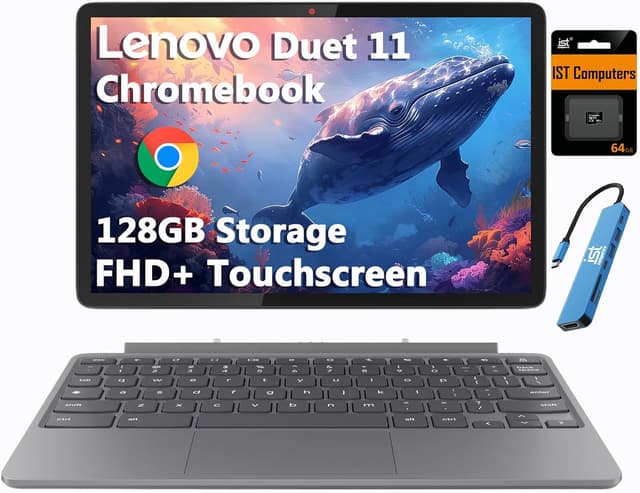
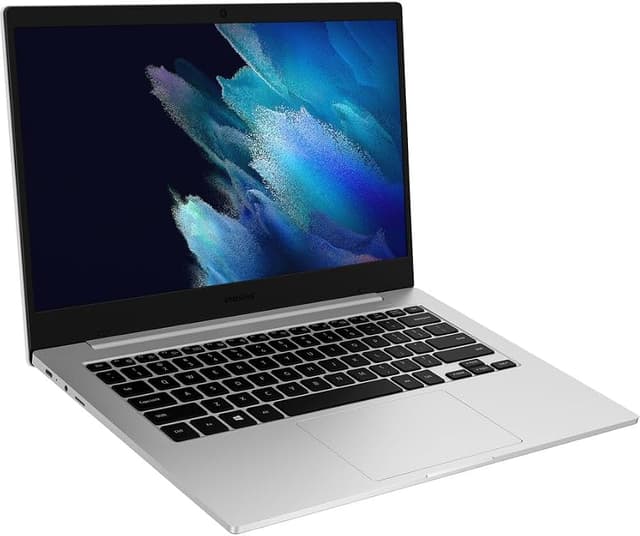
TopsFive comparison scores
Side by side
| Lenovo Chromebook Duet Gen 9 | Samsung Galaxy Chromebook Go | |
|---|---|---|
| OS | ChromeOS | Chrome OS |
| Processor | MediaTek Kompanio 838 | Intel Celeron N4500 |
| RAM | 4GB LPDDR4X | 4GB |
| Storage | 64GB eMMC + 64GB microSD (bundled) | 32GB - 64GB eMMC |
| Display | 10.95" WUXGA IPS Touch 1920x1200 | 14" FHD 1920x1080 |
| Weight | 1.1 lbs (tablet only) | 3.2 lbs |
| Battery | 29Wh, up to 12 hours | Up to 12 hours |
| GPU | Arm Mali-G57 MC3 (integrated) | — |
| Ports | 2x USB-C (power delivery, DisplayPort) | — |
| Cameras | 8MP rear, 5MP front with privacy shutter | — |
| Wireless | Wi-Fi 6, Bluetooth 5.3 | — |
| Price | Check price → | Check price → |
How they differ in real use
Built from our light use laptops scoring, each product's published specifications, and verified owner feedback — not hands-on testing.
Both the Lenovo Chromebook Duet Gen 9 and the Samsung Galaxy Chromebook Go made our Top 5 Light Use Laptops, at #2 and #4. The Duet Gen 9 is the most flexible light-use pick and the only detachable here: it pairs a 10.95-inch 1920x1200 touchscreen with an included keyboard and kickstand cover, and its efficient Kompanio 838 runs roughly 10-12 hours per charge, though its short-travel folio keyboard is less comfortable than the clamshell Chromebooks for long typing sessions. The Galaxy Chromebook Go is useful for buyers who care about light weight and optional always-connected configurations more than display quality.
We score light use laptops on Value (35%), Ease of Use (25%), Battery Life (20%), Reliability (15%) and Display (5%). On that basis the Lenovo Chromebook Duet Gen 9 totals 8.6 out of 10 and the Samsung Galaxy Chromebook Go 8.3. The widest gap is Value, where the Lenovo Chromebook Duet Gen 9 scores 9 against 8 for the Samsung Galaxy Chromebook Go: price for what you get. Reliability also separates them: 9 for the Samsung Galaxy Chromebook Go versus 8 for the Lenovo Chromebook Duet Gen 9.
On paper, the specifications that actually differ: Operating System: ChromeOS on the Lenovo Chromebook Duet Gen 9 versus Chrome OS on the Samsung Galaxy Chromebook Go; CPU: MediaTek Kompanio 838 on the Lenovo Chromebook Duet Gen 9 versus Intel Celeron N4500 on the Samsung Galaxy Chromebook Go; RAM: 4GB LPDDR4X on the Lenovo Chromebook Duet Gen 9 versus 4GB on the Samsung Galaxy Chromebook Go; Storage: 64GB eMMC + 64GB microSD (bundled) on the Lenovo Chromebook Duet Gen 9 versus 32GB - 64GB eMMC on the Samsung Galaxy Chromebook Go; Display: 10.95" WUXGA IPS Touch 1920x1200 on the Lenovo Chromebook Duet Gen 9 versus 14" FHD 1920x1080 on the Samsung Galaxy Chromebook Go; Weight: 1.1 lbs (tablet only) on the Lenovo Chromebook Duet Gen 9 versus 3.2 lbs on the Samsung Galaxy Chromebook Go.
Check current pricing at the merchant links below. Owners praise the Lenovo Chromebook Duet Gen 9 for works as both an 11-inch tablet and a small laptop, with keyboard and stand cover included and 10.95" 1920x1200 IPS touchscreen with USI pen support; the most common complaint is 4GB of memory limits heavy multitasking. Owners praise the Samsung Galaxy Chromebook Go for very lightweight and LTE option; the most common complaint is basic display.
Lenovo Chromebook Duet Gen 9
- Works as both an 11-inch tablet and a small laptop, with keyboard and stand cover included
- 10.95" 1920x1200 IPS touchscreen with USI pen support
- Passively cooled and silent
- Roughly 10-12 hours of battery life per Lenovo's rating and Notebookcheck's review
- 4GB of memory limits heavy multitasking
- Folio keyboard has short travel: fine for notes, less comfortable for long typing sessions
- Only 64GB of built-in eMMC storage (the bundled microSD card adds space)
Samsung Galaxy Chromebook Go
- Very lightweight
- LTE option
- Durable build
- Good keyboard
- Basic display
- Modest performance
- Chrome OS limits
Which should you buy?
The Lenovo Chromebook Duet Gen 9 is the better fit for tablet lovers and streaming and reading; it is the higher-scoring pick here, chiefly for Value and Display. The Samsung Galaxy Chromebook Go is the better fit for on-the-go users and those wanting LTE, and the stronger choice if Reliability matters more to you than the overall score. The Lenovo Chromebook Duet Gen 9 is a poor fit for heavy typing; the Samsung Galaxy Chromebook Go is a poor fit for power users.
Choose the Lenovo Chromebook Duet Gen 9 if
- Tablet lovers
- Streaming and reading
- Light work on the go
Skip it if
- Heavy typing
- Power users
Choose the Samsung Galaxy Chromebook Go if
- On-the-go users
- Those wanting LTE
- Light work
Skip it if
- Power users
- Heavy multitasking
Common questions
Is the Lenovo Chromebook Duet Gen 9 better than the Samsung Galaxy Chromebook Go?
In our Light Use Laptops ranking the Lenovo Chromebook Duet Gen 9 scores higher overall, 8.6 to 8.3, with the biggest advantage in Value. The Samsung Galaxy Chromebook Go is stronger on Reliability, so it is the better pick if that matters most to you.
What is the main difference between the Lenovo Chromebook Duet Gen 9 and the Samsung Galaxy Chromebook Go?
The headline spec difference is Operating System: ChromeOS on the Lenovo Chromebook Duet Gen 9 versus Chrome OS on the Samsung Galaxy Chromebook Go. In use, the gap that matters most is Value (9 vs 8 in our scoring): price for what you get.