Lenovo Chromebook Duet Gen 9 vs ASUS Chromebook CM14
Lenovo Chromebook Duet Gen 9 (#2) vs ASUS Chromebook CM14 (#5): in our Light Use Laptops scoring the Lenovo Chromebook Duet Gen 9 totals 8.6/10 and the ASUS Chromebook CM14 8/10, the Lenovo Chromebook Duet Gen 9 leading on Value and Battery Life.
We may earn a commission when you buy through our links.
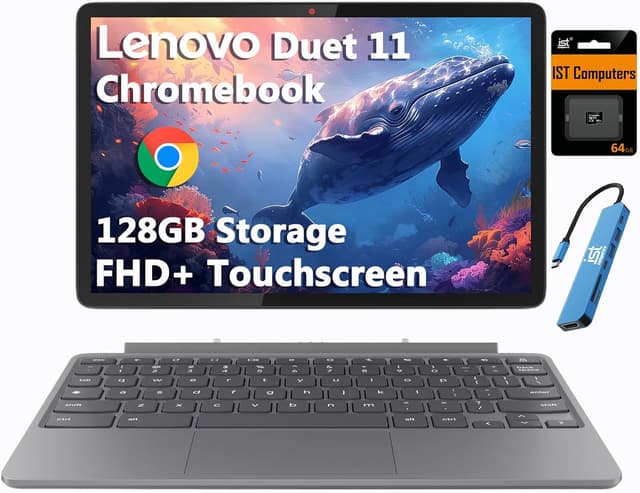
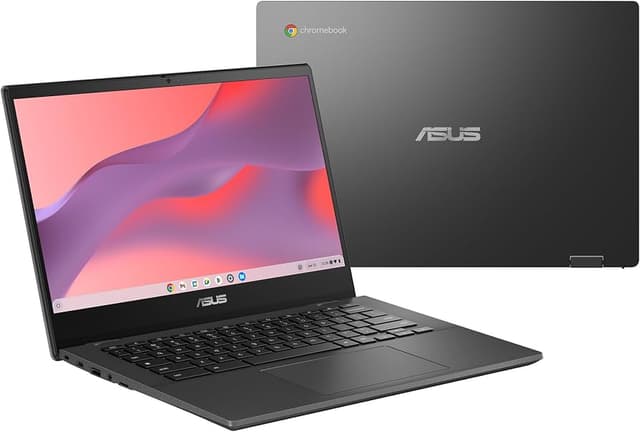
TopsFive comparison scores
Side by side
| Lenovo Chromebook Duet Gen 9 | ASUS Chromebook CM14 | |
|---|---|---|
| OS | ChromeOS | Chrome OS |
| Processor | MediaTek Kompanio 838 | MediaTek Kompanio 520 |
| RAM | 4GB LPDDR4X | 4GB - 8GB |
| Storage | 64GB eMMC + 64GB microSD (bundled) | 64GB eMMC |
| Display | 10.95" WUXGA IPS Touch 1920x1200 | 14" FHD 1920x1080 |
| Weight | 1.1 lbs (tablet only) | 3.1 lbs |
| Battery | 29Wh, up to 12 hours | Up to 10 hours |
| GPU | Arm Mali-G57 MC3 (integrated) | — |
| Ports | 2x USB-C (power delivery, DisplayPort) | — |
| Cameras | 8MP rear, 5MP front with privacy shutter | — |
| Wireless | Wi-Fi 6, Bluetooth 5.3 | — |
| Price | Check price → | Check price → |
How they differ in real use
Built from our light use laptops scoring, each product's published specifications, and verified owner feedback — not hands-on testing.
Both the Lenovo Chromebook Duet Gen 9 and the ASUS Chromebook CM14 made our Top 5 Light Use Laptops, at #2 and #5. The Duet Gen 9 is the most flexible light-use pick and the only detachable here: it pairs a 10.95-inch 1920x1200 touchscreen with an included keyboard and kickstand cover, and its efficient Kompanio 838 runs roughly 10-12 hours per charge, though its short-travel folio keyboard is less comfortable than the clamshell Chromebooks for long typing sessions. The ASUS Chromebook CM14 is a sturdy basic Chromebook with a usable keyboard and display, but it is less compelling unless its exact configuration is discounted.
We score light use laptops on Value (35%), Ease of Use (25%), Battery Life (20%), Reliability (15%) and Display (5%). On that basis the Lenovo Chromebook Duet Gen 9 totals 8.6 out of 10 and the ASUS Chromebook CM14 8. The widest gap is Value, where the Lenovo Chromebook Duet Gen 9 scores 9 against 8 for the ASUS Chromebook CM14: price for what you get. Battery Life also separates them: 9 for the Lenovo Chromebook Duet Gen 9 versus 8 for the ASUS Chromebook CM14.
On paper, the specifications that actually differ: Operating System: ChromeOS on the Lenovo Chromebook Duet Gen 9 versus Chrome OS on the ASUS Chromebook CM14; CPU: MediaTek Kompanio 838 on the Lenovo Chromebook Duet Gen 9 versus MediaTek Kompanio 520 on the ASUS Chromebook CM14; RAM: 4GB LPDDR4X on the Lenovo Chromebook Duet Gen 9 versus 4GB - 8GB on the ASUS Chromebook CM14; Storage: 64GB eMMC + 64GB microSD (bundled) on the Lenovo Chromebook Duet Gen 9 versus 64GB eMMC on the ASUS Chromebook CM14; Display: 10.95" WUXGA IPS Touch 1920x1200 on the Lenovo Chromebook Duet Gen 9 versus 14" FHD 1920x1080 on the ASUS Chromebook CM14; Weight: 1.1 lbs (tablet only) on the Lenovo Chromebook Duet Gen 9 versus 3.1 lbs on the ASUS Chromebook CM14.
Check current pricing at the merchant links below. Owners praise the Lenovo Chromebook Duet Gen 9 for works as both an 11-inch tablet and a small laptop, with keyboard and stand cover included and 10.95" 1920x1200 IPS touchscreen with USI pen support; the most common complaint is 4GB of memory limits heavy multitasking. Owners praise the ASUS Chromebook CM14 for good build quality and decent performance; the most common complaint is not the cheapest.
Lenovo Chromebook Duet Gen 9
- Works as both an 11-inch tablet and a small laptop, with keyboard and stand cover included
- 10.95" 1920x1200 IPS touchscreen with USI pen support
- Passively cooled and silent
- Roughly 10-12 hours of battery life per Lenovo's rating and Notebookcheck's review
- 4GB of memory limits heavy multitasking
- Folio keyboard has short travel: fine for notes, less comfortable for long typing sessions
- Only 64GB of built-in eMMC storage (the bundled microSD card adds space)
ASUS Chromebook CM14
- Good build quality
- Decent performance
- Nice keyboard
- Good display
- Not the cheapest
- Chrome OS limits
- Average battery
Which should you buy?
The Lenovo Chromebook Duet Gen 9 is the better fit for tablet lovers and streaming and reading; it is the higher-scoring pick here, chiefly for Value and Battery Life. The ASUS Chromebook CM14 is the better fit for everyday use and students. The Lenovo Chromebook Duet Gen 9 is a poor fit for heavy typing; the ASUS Chromebook CM14 is a poor fit for heavy tasks.
Choose the Lenovo Chromebook Duet Gen 9 if
- Tablet lovers
- Streaming and reading
- Light work on the go
Skip it if
- Heavy typing
- Power users
Choose the ASUS Chromebook CM14 if
- Everyday use
- Students
- Basic productivity
Skip it if
- Heavy tasks
- Windows users
Common questions
Is the Lenovo Chromebook Duet Gen 9 better than the ASUS Chromebook CM14?
In our Light Use Laptops ranking the Lenovo Chromebook Duet Gen 9 scores higher overall, 8.6 to 8, with the biggest advantage in Value. The ASUS Chromebook CM14 does not out-score it on any criterion we weigh.
What is the main difference between the Lenovo Chromebook Duet Gen 9 and the ASUS Chromebook CM14?
The headline spec difference is Operating System: ChromeOS on the Lenovo Chromebook Duet Gen 9 versus Chrome OS on the ASUS Chromebook CM14. In use, the gap that matters most is Value (9 vs 8 in our scoring): price for what you get.