Bambu Lab P2S Combo vs Bambu Lab A1 Combo
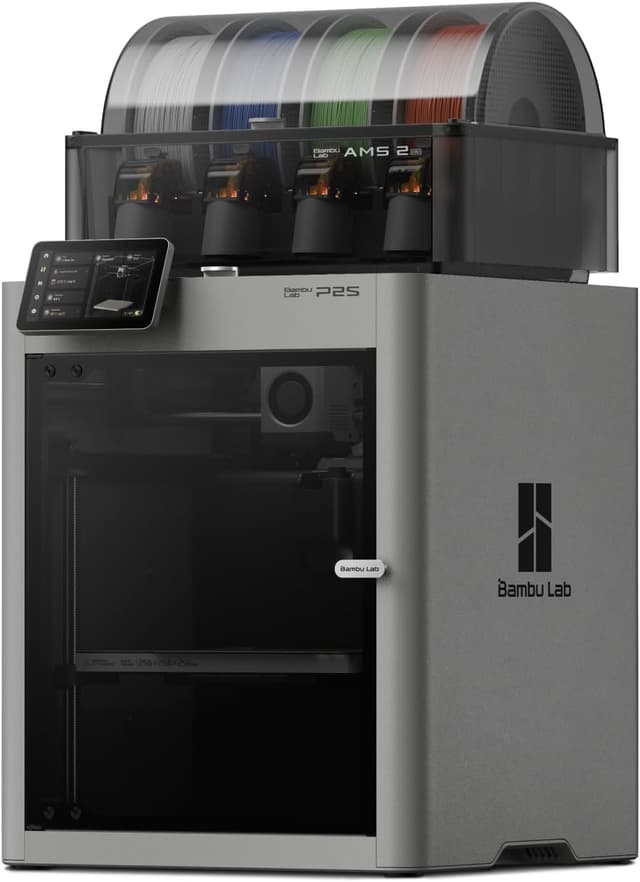
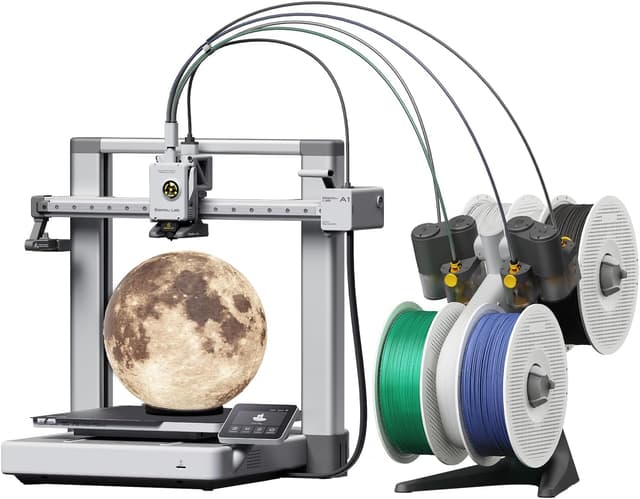
Bambu Lab P2S Combo (#2) vs Bambu Lab A1 Combo (#5, best budget): in our Multi-Color 3D Printers Under $1,000 scoring the Bambu Lab P2S Combo totals 8.9/10 and the Bambu Lab A1 Combo 7.5/10.
We may earn a commission when you buy through our links.
TopsFive comparison scores
Side by side
| Bambu Lab P2S Combo | Bambu Lab A1 Combo | |
|---|---|---|
| Multi-Color System | AMS 2 Pro (single-nozzle filament swapping) | AMS lite (single-nozzle filament swapping) |
| Max Colors | 4 included; up to 20 with extra AMS units | 4 |
| Toolheads / Nozzles | 1 toolhead, 1 nozzle | 1 toolhead, 1 nozzle |
| Filament Drying | Yes, built into the AMS 2 Pro | No |
| Build Volume | 256 × 256 × 256 mm | 256 × 256 × 256 mm |
| Max Speed | 600 mm/s | 500 mm/s |
| Max Nozzle Temp | 300°C (hardened steel) | 300°C (stainless steel) |
| Enclosure / Chamber | Fully enclosed; retains about 50°C, no active heater | Open frame |
| Weight | About 15 kg printer; 16.4 kg with AMS 2 Pro | 8.3 kg printer (without AMS lite) |
| Max Acceleration | 20,000 mm/s² | 10,000 mm/s² |
| Max Bed Temp | 110°C | 100°C |
| Max Hotend Flow | 40 mm³/s | — |
| Dimensions | 392 × 406 × 478 mm (printer) | 465 × 410 × 430 mm (printer) |
| Slicer | Bambu Studio (Orca Slicer also supported) | Bambu Studio (Orca Slicer also supported) |
| Price | Check price → | Check price → |
How they differ in real use
Built from our multi color 3d printers scoring, each product's published specifications, and verified owner feedback — not hands-on testing.
Both the Bambu Lab P2S Combo and the Bambu Lab A1 Combo made our Top 5 Multi-Color 3D Printers Under $1,000, at #2 and #5 (best budget). The most complete single-nozzle multi-color package and the best pick sold on Amazon US: the AMS 2 Pro dries spools while it prints, expands from 4 to 20 colors with extra AMS units, and Bambu Studio with the MakerWorld library makes painting and slicing a multi-color model easier than on any non-Bambu pick. The enclosed CoreXY printer (600 mm/s, hardened-steel 300°C nozzle, a chamber that retains about 50°C) also handles ABS and ASA. It ranks below the X2D because every color change purges through its single nozzle and its chamber is not actively heated. It ranks above the Snapmaker U1 because the U1 stops at four colors, has an open top and no drying, while the P2S gives up only purge waste and slower color changes in exchange for a more polished, more expandable system at a similar price. The easiest and lowest-cost way into multi-color printing: full-auto calibration, the AMS lite and Bambu Studio's paint tools let a first-time owner print a four-color model with almost no tuning, and Tom's Hardware's reviewer named AMS lite their favorite multicolor system for its simplicity and reliability. It ranks last because it is an open-frame bed slinger (10,000 mm/s² acceleration against 20,000 on every other printer here), it suits PLA, PETG and TPU rather than ABS or ASA, and AMS lite cannot chain beyond four colors, dry filament or feed TPU. Choose it over the Centauri Carbon 2 Combo if you will print mostly PLA and value the Bambu Lab ecosystem over an enclosure.
We score multi-color 3d printers under $1,000 on Multi-Color System (30%), Print Quality & Speed (20%), Material Capability (15%), Ease of Use & Software (20%) and Value (15%). On that basis the Bambu Lab P2S Combo totals 8.9 out of 10 and the Bambu Lab A1 Combo 7.5. The widest gap is Multi-Color System, where the Bambu Lab P2S Combo scores 9 against 7 for the Bambu Lab A1 Combo: how many colors it handles out of the box and with expansion, how fast it changes color, how much filament each change purges, and how reliably reviewers found it swapping. Material Capability also separates them: 8 for the Bambu Lab P2S Combo versus 4 for the Bambu Lab A1 Combo. The Bambu Lab A1 Combo claws back ground on Value.
On paper, the specifications that actually differ: Multi-Color System: AMS 2 Pro (single-nozzle filament swapping) on the Bambu Lab P2S Combo versus AMS lite (single-nozzle filament swapping) on the Bambu Lab A1 Combo; Max Colors: 4 included; up to 20 with extra AMS units on the Bambu Lab P2S Combo versus 4 on the Bambu Lab A1 Combo; Filament Drying: Yes, built into the AMS 2 Pro on the Bambu Lab P2S Combo versus No on the Bambu Lab A1 Combo; Max Speed: 600 mm/s on the Bambu Lab P2S Combo versus 500 mm/s on the Bambu Lab A1 Combo; Max Nozzle Temp: 300°C (hardened steel) on the Bambu Lab P2S Combo versus 300°C (stainless steel) on the Bambu Lab A1 Combo; Enclosure / Chamber: Fully enclosed; retains about 50°C, no active heater on the Bambu Lab P2S Combo versus Open frame on the Bambu Lab A1 Combo. They match on Toolheads / Nozzles and Build Volume.
Check current pricing at the merchant links below. Owners praise the Bambu Lab P2S Combo for built-in filament drying in the AMS 2 Pro (shared only with the X2D Combo here) and expansion from 4 to 20 colors with extra AMS 2 Pro and AMS HT units; the most common complaint is purge waste on every color change, which on prints with many color changes can rival the weight of the model itself. Owners praise the Bambu Lab A1 Combo for the easiest setup here thanks to full-auto calibration and core-mounted spools in the AMS lite that accept more third-party spool sizes, including cardboard; the most common complaint is an open-frame bed slinger: not suited to ABS or ASA, and its 10,000 mm/s² acceleration is half that of the CoreXY printers here.
Bambu Lab P2S Combo
- Built-in filament drying in the AMS 2 Pro (shared only with the X2D Combo here)
- Expansion from 4 to 20 colors with extra AMS 2 Pro and AMS HT units
- The most polished software here: Bambu Studio, the Bambu Handy app and the MakerWorld library of ready-to-print multi-color models
- Enclosed CoreXY frame at 600 mm/s with a hardened-steel nozzle and carbon filter for ABS, ASA and fiber-filled filaments
- Purge waste on every color change, which on prints with many color changes can rival the weight of the model itself
- Color changes take far longer than the Snapmaker U1's tool swaps, which adds hours to heavily multi-colored prints
- No active chamber heater: the enclosure only retains about 50°C, short of the X2D's actively heated 65°C chamber
Bambu Lab A1 Combo
- The easiest setup here thanks to full-auto calibration
- Core-mounted spools in the AMS lite that accept more third-party spool sizes, including cardboard
- Bambu Studio's paint tools and the MakerWorld library of ready-to-print multi-color models
- The lowest price in this list
- An open-frame bed slinger: not suited to ABS or ASA, and its 10,000 mm/s² acceleration is half that of the CoreXY printers here
- AMS lite cannot be chained beyond four colors and has no filament drying
- AMS lite cannot feed TPU, so flexible filament needs a separate spool holder
Which should you buy?
The Bambu Lab P2S Combo is the better fit for first-time multi-color buyers who want it to just work and printing PLA, PETG, ABS and ASA from one machine; it is the higher-scoring pick here, chiefly for Multi-Color System and Material Capability. The Bambu Lab A1 Combo is the better fit for first-time and family multi-color printing in PLA and the lowest price of entry, and the stronger choice if Value matters more to you than the overall score. The Bambu Lab P2S Combo is a poor fit for buyers who want minimal filament waste per color change; the Bambu Lab A1 Combo is a poor fit for printing ABS, ASA or other filaments that need an enclosure.
Choose the Bambu Lab P2S Combo if
- First-time multi-color buyers who want it to just work
- Printing PLA, PETG, ABS and ASA from one machine
- Growing past four colors later
Skip it if
- Buyers who want minimal filament waste per color change
- Nylon or polycarbonate parts that need an actively heated chamber
Choose the Bambu Lab A1 Combo if
- First-time and family multi-color printing in PLA
- The lowest price of entry
- The Bambu Lab and MakerWorld ecosystem
Skip it if
- Printing ABS, ASA or other filaments that need an enclosure
- More than four colors in one print
Common questions
Is the Bambu Lab P2S Combo better than the Bambu Lab A1 Combo?
In our Multi-Color 3D Printers Under $1,000 ranking the Bambu Lab P2S Combo scores higher overall, 8.9 to 7.5, with the biggest advantage in Multi-Color System. The Bambu Lab A1 Combo is stronger on Value, so it is the better pick if that matters most to you.
What is the main difference between the Bambu Lab P2S Combo and the Bambu Lab A1 Combo?
The headline spec difference is Multi-Color System: AMS 2 Pro (single-nozzle filament swapping) on the Bambu Lab P2S Combo versus AMS lite (single-nozzle filament swapping) on the Bambu Lab A1 Combo. In use, the gap that matters most is Multi-Color System (9 vs 7 in our scoring): how many colors it handles out of the box and with expansion, how fast it changes color, how much filament each change purges, and how reliably reviewers found it swapping.