Bambu Lab A1 mini vs Creality Ender-3 V3 SE
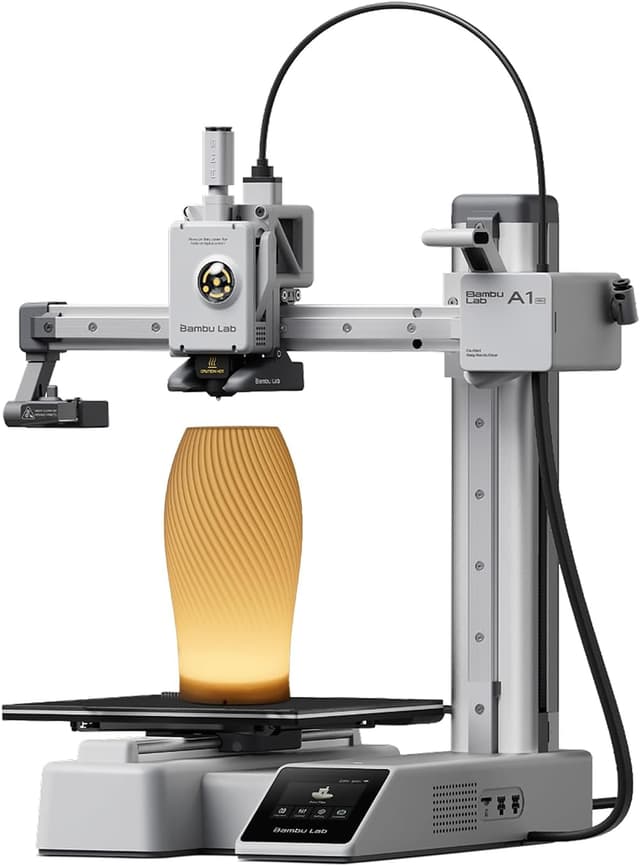
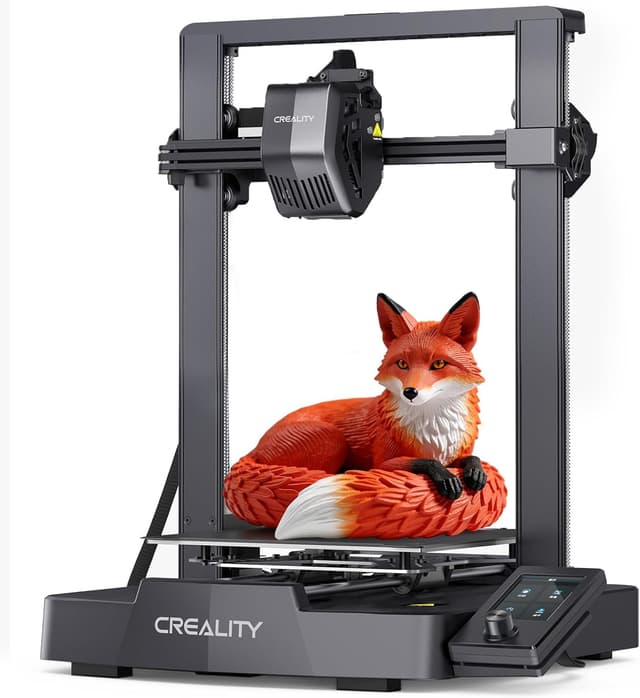
Bambu Lab A1 mini (#1, best overall) vs Creality Ender-3 V3 SE (#5, best budget): in our 3D Printers for Kids scoring the Bambu Lab A1 mini totals 8.2/10 and the Creality Ender-3 V3 SE 6.1/10, the Bambu Lab A1 mini leading on Ease of Use for Kids and Safety.
We may earn a commission when you buy through our links.
TopsFive comparison scores
Side by side
| Bambu Lab A1 mini | Creality Ender-3 V3 SE | |
|---|---|---|
| Recommended Age | About 9+ with supervision (8–12 per GeekBitz) | Teens (about 12+) |
| Build Volume | 180 × 180 × 180 mm | 220 × 220 × 250 mm |
| Enclosure | Open frame (bed slinger) | Open frame (bed slinger) |
| Setup & Calibration | About 15 minutes; full-auto calibration | Partial assembly; CR Touch auto bed leveling |
| How Kids Print | Bambu Handy phone app or touchscreen, MakerWorld model library | Desktop slicer (Creality Print) to microSD card; 3.2-inch dial screen |
| Connectivity | Wi-Fi, microSD | microSD (no Wi-Fi) |
| Max Speed | 500 mm/s | 250 mm/s |
| Filaments | PLA, PETG, TPU | PLA, PETG, TPU |
| Max Bed Temp | 80°C | 100°C |
| Noise | Under 48 dB in silent mode | — |
| Weight | 5.5 kg | — |
| Upgrade Path | AMS lite for 4-color printing | — |
| Extruder | — | Sprite direct drive |
| Price | Check price → | Check price → |
How they differ in real use
Built from our 3d printers for kids scoring, each product's published specifications, and verified owner feedback — not hands-on testing.
Both the Bambu Lab A1 mini and the Creality Ender-3 V3 SE made our Top 5 3D Printers for Kids, at #1 (best overall) and #5 (best budget). The best first 3D printer for most kids about nine and up, and the top pick of Tom's Hardware, 3DPrintGearLab and GeekBitz: full-auto calibration and a roughly 15-minute setup remove the bed-leveling step that defeats beginners, the Bambu Handy app prints MakerWorld models from a phone, and it runs under 48 dB in silent mode. It ranks above the Flashforge Adventurer 5M Pro because it is easier for a child to run, much quieter, cheaper and can add four-color printing later; the Adventurer wins only on enclosure and filtration. It beats the Toybox Alpha Three because its 180 mm cube holds about ten times the Toybox's print volume, so a child keeps using it for years instead of outgrowing it by about age 10. Its weakness is the open frame: the hot nozzle and moving bed are exposed, so younger children need an adult nearby. The cheapest way to give a teenager a full-size printer, and the budget teen pick in 3DPrintGearLab's and GeekBitz's guides: a 220 × 220 × 250 mm volume, CR Touch auto bed leveling and a Sprite direct-drive extruder that handles TPU, at the lowest price here. It ranks last because it asks the most of its owner: partial assembly, no Wi-Fi or phone app (prints go from a desktop slicer to a microSD card), a dial-driven 3.2-inch screen and an open frame. Against the Bambu Lab A1 it trades the A1's one-tap workflow and silent mode for a lower price and a more hackable design, which suits a teen who wants to learn how printers work rather than just print.
We score 3d printers for kids on Ease of Use for Kids (25%), Safety (20%), Print Quality & Reliability (20%), Room to Grow (10%), Noise & Home Fit (10%) and Value (15%). On that basis the Bambu Lab A1 mini totals 8.2 out of 10 and the Creality Ender-3 V3 SE 6.1. The widest gap is Ease of Use for Kids, where the Bambu Lab A1 mini scores 9 against 5 for the Creality Ender-3 V3 SE: whether a child can start a print alone: setup time, automatic calibration or leveling, and app or touchscreen printing from a ready-made model library instead of a desktop slicer. Safety also separates them: 6 for the Bambu Lab A1 mini versus 4 for the Creality Ender-3 V3 SE.
On paper, the specifications that actually differ: Recommended Age: About 9+ with supervision (8–12 per GeekBitz) on the Bambu Lab A1 mini versus Teens (about 12+) on the Creality Ender-3 V3 SE; Build Volume: 180 × 180 × 180 mm on the Bambu Lab A1 mini versus 220 × 220 × 250 mm on the Creality Ender-3 V3 SE; Setup & Calibration: About 15 minutes; full-auto calibration on the Bambu Lab A1 mini versus Partial assembly; CR Touch auto bed leveling on the Creality Ender-3 V3 SE; How Kids Print: Bambu Handy phone app or touchscreen, MakerWorld model library on the Bambu Lab A1 mini versus Desktop slicer (Creality Print) to microSD card; 3.2-inch dial screen on the Creality Ender-3 V3 SE; Connectivity: Wi-Fi, microSD on the Bambu Lab A1 mini versus microSD (no Wi-Fi) on the Creality Ender-3 V3 SE; Max Speed: 500 mm/s on the Bambu Lab A1 mini versus 250 mm/s on the Creality Ender-3 V3 SE. They match on Enclosure and Filaments.
Check current pricing at the merchant links below. Owners praise the Bambu Lab A1 mini for full-auto calibration and a roughly 15-minute setup, so there is no manual bed leveling for a child to get wrong and phone printing from the Bambu Handy app and the MakerWorld library of ready-to-print models; the most common complaint is open frame with an exposed hot nozzle and moving bed, so younger children need supervision. Owners praise the Creality Ender-3 V3 SE for the lowest price in this list for a full-size 220 × 220 × 250 mm build volume and CR Touch automatic bed leveling; the most common complaint is no Wi-Fi or phone app: prints go through a desktop slicer and a microSD card.
Bambu Lab A1 mini
- Full-auto calibration and a roughly 15-minute setup, so there is no manual bed leveling for a child to get wrong
- Phone printing from the Bambu Handy app and the MakerWorld library of ready-to-print models
- Rated under 48 dB in silent mode, quiet enough for a bedroom or shared room
- Grows with the child: an optional AMS lite adds four-color printing later
- Open frame with an exposed hot nozzle and moving bed, so younger children need supervision
- 180 mm cube build volume, smaller than the full-size A1, Adventurer 5M Pro or Ender-3 V3 SE
- 80°C bed limits it to PLA, PETG and TPU; no ABS or ASA
Creality Ender-3 V3 SE
- The lowest price in this list for a full-size 220 × 220 × 250 mm build volume
- CR Touch automatic bed leveling
- Sprite direct-drive extruder prints flexible TPU
- Open, widely modded design with a large owner community for troubleshooting
- No Wi-Fi or phone app: prints go through a desktop slicer and a microSD card
- Requires some assembly and more tinkering than any other pick
- Open frame and a dated dial interface make it a teen printer, not a young child's
Which should you buy?
The Bambu Lab A1 mini is the better fit for kids about 9 and up with an adult nearby and a first printer a child will not outgrow quickly; it is the higher-scoring pick here, chiefly for Ease of Use for Kids and Safety. The Creality Ender-3 V3 SE is the better fit for teens who want to learn how a 3D printer works and the tightest budget. The Bambu Lab A1 mini is a poor fit for young children printing unsupervised; the Creality Ender-3 V3 SE is a poor fit for young children.
Choose the Bambu Lab A1 mini if
- Kids about 9 and up with an adult nearby
- A first printer a child will not outgrow quickly
- Families who want phone-based, one-tap printing
Skip it if
- Young children printing unsupervised
- Large one-piece prints such as helmets or cosplay parts
Choose the Creality Ender-3 V3 SE if
- Teens who want to learn how a 3D printer works
- The tightest budget
- Tinkerers who plan to upgrade and mod
Skip it if
- Young children
- Families who want phone-based, one-tap printing
Common questions
Is the Bambu Lab A1 mini better than the Creality Ender-3 V3 SE?
In our 3D Printers for Kids ranking the Bambu Lab A1 mini scores higher overall, 8.2 to 6.1, with the biggest advantage in Ease of Use for Kids. The Creality Ender-3 V3 SE does not out-score it on any criterion we weigh.
What is the main difference between the Bambu Lab A1 mini and the Creality Ender-3 V3 SE?
The headline spec difference is Recommended Age: About 9+ with supervision (8–12 per GeekBitz) on the Bambu Lab A1 mini versus Teens (about 12+) on the Creality Ender-3 V3 SE. In use, the gap that matters most is Ease of Use for Kids (9 vs 5 in our scoring): whether a child can start a print alone: setup time, automatic calibration or leveling, and app or touchscreen printing from a ready-made model library instead of a desktop slicer.