AVerMedia Live Gamer Ultra 2.1 vs AVerMedia Live Gamer 4K 2.1
AVerMedia Live Gamer Ultra 2.1 (#2, best value) vs AVerMedia Live Gamer 4K 2.1 (#3): in our Capture Cards scoring the AVerMedia Live Gamer Ultra 2.1 totals 9.2/10 and the AVerMedia Live Gamer 4K 2.1 8.8/10.
We may earn a commission when you buy through our links.
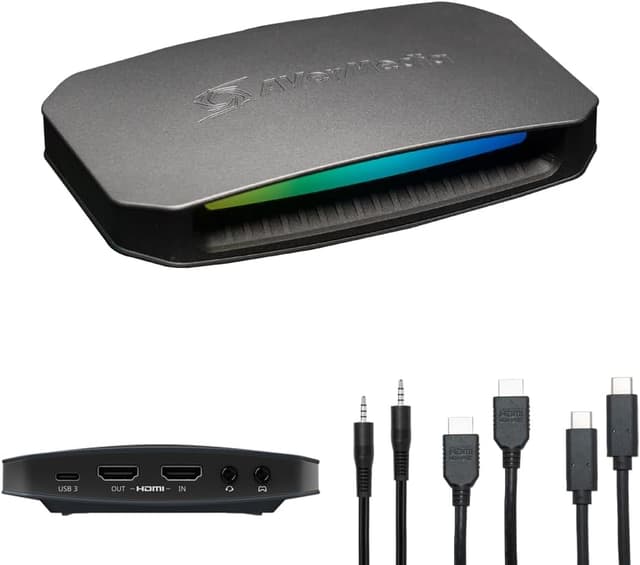
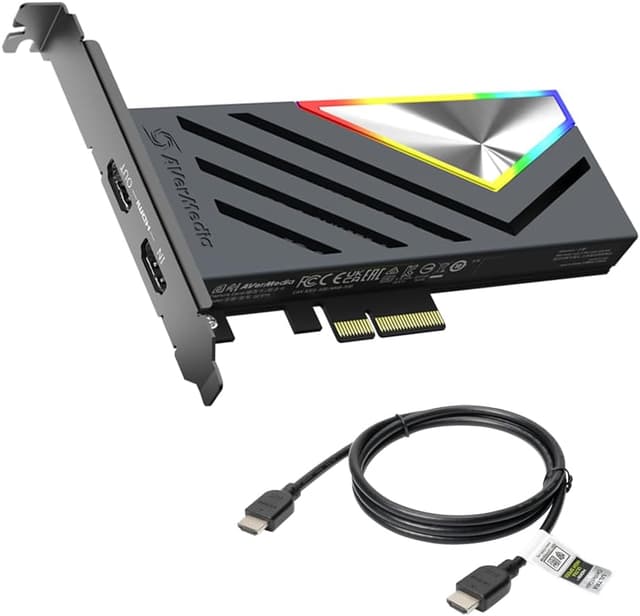
TopsFive comparison scores
Side by side
| AVerMedia Live Gamer Ultra 2.1 | AVerMedia Live Gamer 4K 2.1 | |
|---|---|---|
| Max Capture | 4K @ 144fps (Windows) / 4K60 (macOS) | 4K @ 144fps / 4K60 standard |
| Max Passthrough | 4K @ 144fps HDR/VRR | 4K @ 144fps HDR/VRR |
| Connection | USB 3.2 Gen 2 (Type-C) | PCIe Gen 3 x4 |
| HDMI | 2.1 | 2.1 (in + out) |
| Audio | 3.5mm TRRS + 5.1 surround | 5.1 multi-channel |
| Weight | 115g | 150g |
| Price | Check price → | Check price → |
How they differ in real use
Built from our capture cards scoring, each product's published specifications, and verified owner feedback — not hands-on testing.
Both the AVerMedia Live Gamer Ultra 2.1 and the AVerMedia Live Gamer 4K 2.1 made our Top 5 Capture Cards, at #2 (best value) and #3. Matches the Elgato 4K X on HDMI 2.1 specs at a lower price, and adds 5.1 surround capture, a headset jack for party chat, and ultrawide support. The most feature-rich external capture card dollar-for-dollar. The best internal capture card for dual-PC setups. Its PCIe Gen 3 x4 connection eliminates USB bandwidth concerns entirely, with HDMI 2.1 passthrough up to 4K144 HDR/VRR. The lowest latency option for professional streaming configurations.
We score capture cards on Capture Quality (35%), Passthrough (25%), Compatibility (20%), Build Quality (10%) and Value (10%). On that basis the AVerMedia Live Gamer Ultra 2.1 totals 9.2 out of 10 and the AVerMedia Live Gamer 4K 2.1 8.8. The widest gap is Compatibility, where the AVerMedia Live Gamer Ultra 2.1 scores 8 against 6 for the AVerMedia Live Gamer 4K 2.1: software and platform. Build Quality also separates them: 9 for the AVerMedia Live Gamer 4K 2.1 versus 8 for the AVerMedia Live Gamer Ultra 2.1.
On paper, the specifications that actually differ: Max Capture: 4K @ 144fps (Windows) / 4K60 (macOS) on the AVerMedia Live Gamer Ultra 2.1 versus 4K @ 144fps / 4K60 standard on the AVerMedia Live Gamer 4K 2.1; Connection: USB 3.2 Gen 2 (Type-C) on the AVerMedia Live Gamer Ultra 2.1 versus PCIe Gen 3 x4 on the AVerMedia Live Gamer 4K 2.1; HDMI: 2.1 on the AVerMedia Live Gamer Ultra 2.1 versus 2.1 (in + out) on the AVerMedia Live Gamer 4K 2.1; Audio: 3.5mm TRRS + 5.1 surround on the AVerMedia Live Gamer Ultra 2.1 versus 5.1 multi-channel on the AVerMedia Live Gamer 4K 2.1; Weight: 115g on the AVerMedia Live Gamer Ultra 2.1 versus 150g on the AVerMedia Live Gamer 4K 2.1. They match on Max Passthrough.
Check current pricing at the merchant links below. Owners praise the AVerMedia Live Gamer Ultra 2.1 for 4K144 HDR/VRR passthrough with HDMI 2.1 and 5.1 multi-channel surround sound capture; the most common complaint is 4K144 capture requires high-end PC. Owners praise the AVerMedia Live Gamer 4K 2.1 for pCIe connection eliminates USB bandwidth bottleneck and 4K144 HDR/VRR passthrough with HDMI 2.1; the most common complaint is requires desktop PC with PCIe x4 slot.
AVerMedia Live Gamer Ultra 2.1
- 4K144 HDR/VRR passthrough with HDMI 2.1
- 5.1 multi-channel surround sound capture
- Built-in headset jack for party chat
- RGB lighting with Windows Dynamic Lighting
- 4K144 capture requires high-end PC
- macOS limited to 4K60 capture
- Software less polished than Elgato's
AVerMedia Live Gamer 4K 2.1
- PCIe connection eliminates USB bandwidth bottleneck
- 4K144 HDR/VRR passthrough with HDMI 2.1
- 5.1 surround sound capture
- Ultrawide resolution support
- Requires desktop PC with PCIe x4 slot
- Not portable, internal only
- Windows only (no macOS)
Which should you buy?
The AVerMedia Live Gamer Ultra 2.1 is the better fit for console streamers wanting party chat capture and ultrawide monitor users; it is the higher-scoring pick here, chiefly for Compatibility and Value. The AVerMedia Live Gamer 4K 2.1 is the better fit for dual-PC streaming setups and professional streamers wanting lowest latency, and the stronger choice if Build Quality matters more to you than the overall score. The AVerMedia Live Gamer Ultra 2.1 is a poor fit for macOS users needing 4K144; the AVerMedia Live Gamer 4K 2.1 is a poor fit for laptop users.
Choose the AVerMedia Live Gamer Ultra 2.1 if
- Console streamers wanting party chat capture
- Ultrawide monitor users
- Feature-rich streaming setups
Skip it if
- macOS users needing 4K144
- Those wanting minimal setup
Choose the AVerMedia Live Gamer 4K 2.1 if
- Dual-PC streaming setups
- Professional streamers wanting lowest latency
- Desktop users who prefer internal cards
Skip it if
- Laptop users
- macOS users
Common questions
Is the AVerMedia Live Gamer Ultra 2.1 better than the AVerMedia Live Gamer 4K 2.1?
In our Capture Cards ranking the AVerMedia Live Gamer Ultra 2.1 scores higher overall, 9.2 to 8.8, with the biggest advantage in Compatibility. The AVerMedia Live Gamer 4K 2.1 is stronger on Build Quality, so it is the better pick if that matters most to you.
What is the main difference between the AVerMedia Live Gamer Ultra 2.1 and the AVerMedia Live Gamer 4K 2.1?
The headline spec difference is Max Capture: 4K @ 144fps (Windows) / 4K60 (macOS) on the AVerMedia Live Gamer Ultra 2.1 versus 4K @ 144fps / 4K60 standard on the AVerMedia Live Gamer 4K 2.1. In use, the gap that matters most is Compatibility (8 vs 6 in our scoring): software and platform.