ASUS ROG Cetra True Wireless SpeedNova vs Razer Hammerhead V3 HyperSpeed
ASUS ROG Cetra True Wireless SpeedNova (#2) vs Razer Hammerhead V3 HyperSpeed (#4): in our Earbuds for Gaming scoring the ASUS ROG Cetra True Wireless SpeedNova totals 9/10 and the Razer Hammerhead V3 HyperSpeed 8.6/10.
We may earn a commission when you buy through our links.
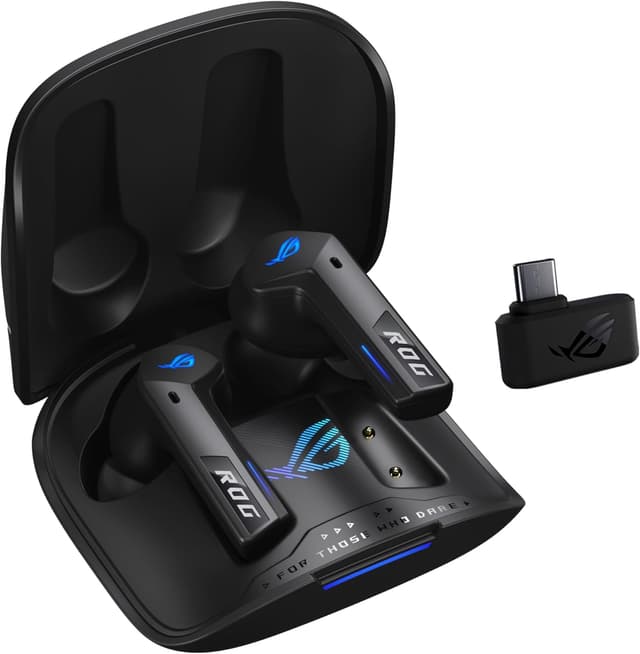
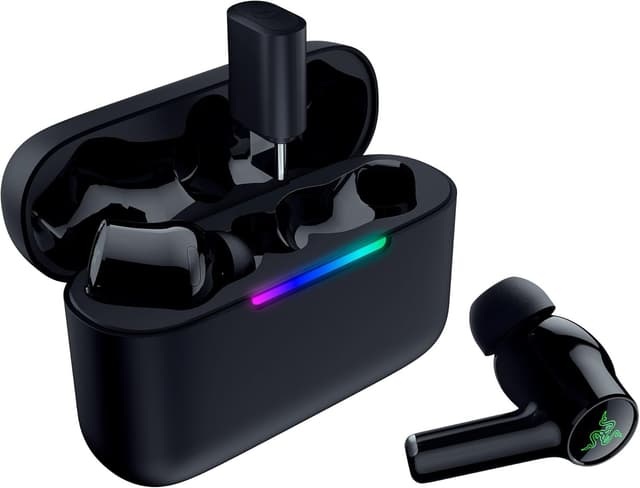
TopsFive comparison scores
Side by side
| ASUS ROG Cetra True Wireless SpeedNova | Razer Hammerhead V3 HyperSpeed | |
|---|---|---|
| Latency | ~30ms (SpeedNova 2.4GHz) | Low-latency 2.4GHz dongle |
| Audio Quality | 24-bit/96kHz (Hi-Res certified) | — |
| Battery | 11h / 46h total | 40 hours total (with case) |
| Platforms | PC, PS5, Switch, Mobile | — |
| Connectivity | — | Bluetooth 6.0 + 2.4GHz HyperSpeed dongle |
| Driver | — | 11mm dynamic |
| Unique Feature | — | THX Spatial Audio (PC) |
| Price | Check price → | Check price → |
How they differ in real use
Built from our earbuds gaming scoring, each product's published specifications, and verified owner feedback — not hands-on testing.
Both the ASUS ROG Cetra True Wireless SpeedNova and the Razer Hammerhead V3 HyperSpeed made our Top 5 Earbuds for Gaming, at #2 and #4. Best microphone quality with boom mic option, plus hi-res audio support for the best-sounding gaming earbuds. Razer's 2026 successor to the Pro HyperSpeed (which is now unavailable on Amazon): THX Spatial Audio on PC, a broader platform list (PC, PS5, Steam Deck, mobile), and 40-hour total battery, at a lower price.
We score earbuds for gaming on Latency (35%), Positional Audio (25%), Microphone Quality (20%), Platform Support (10%) and Battery Life (10%). On that basis the ASUS ROG Cetra True Wireless SpeedNova totals 9 out of 10 and the Razer Hammerhead V3 HyperSpeed 8.6. The widest gap is Microphone Quality, where the ASUS ROG Cetra True Wireless SpeedNova scores 9.5 against 8.5 for the Razer Hammerhead V3 HyperSpeed: voice clarity for team chat. Latency also separates them: 9 for the ASUS ROG Cetra True Wireless SpeedNova versus 8.5 for the Razer Hammerhead V3 HyperSpeed. The Razer Hammerhead V3 HyperSpeed claws back ground on Platform Support and Battery Life.
On paper, the specifications that actually differ: Latency: ~30ms (SpeedNova 2.4GHz) on the ASUS ROG Cetra True Wireless SpeedNova versus Low-latency 2.4GHz dongle on the Razer Hammerhead V3 HyperSpeed; Battery: 11h / 46h total on the ASUS ROG Cetra True Wireless SpeedNova versus 40 hours total (with case) on the Razer Hammerhead V3 HyperSpeed.
Check current pricing at the merchant links below. Owners praise the ASUS ROG Cetra True Wireless SpeedNova for ~30ms latency (SpeedNova 2.4GHz) and 24-bit/96kHz Hi-Res certified; the most common complaint is no Xbox support. Owners praise the Razer Hammerhead V3 HyperSpeed for 2.4GHz HyperSpeed dongle + Bluetooth 6.0 and THX Spatial Audio on PC; the most common complaint is soundGuys and TechRadar rate ANC and sound quality behind the SteelSeries Arctis GameBuds.
ASUS ROG Cetra True Wireless SpeedNova
- ~30ms latency (SpeedNova 2.4GHz)
- 24-bit/96kHz Hi-Res certified
- Bone-conduction microphone
- Dirac Opteo spatial sound
- No Xbox support
- Expensive at $249
- RGB drains battery
Razer Hammerhead V3 HyperSpeed
- 2.4GHz HyperSpeed dongle + Bluetooth 6.0
- THX Spatial Audio on PC
- 40-hour total battery (up from 30h on the Pro)
- Broad platform support: PC, PS5, Steam Deck, smartphones, tablets
- SoundGuys and TechRadar rate ANC and sound quality behind the SteelSeries Arctis GameBuds
- Bulkier case than most rivals
- No confirmed Qi wireless charging (a Pro HyperSpeed feature)
Which should you buy?
The ASUS ROG Cetra True Wireless SpeedNova is the better fit for team communication priority and hi-res audio gamers; it is the higher-scoring pick here, chiefly for Microphone Quality and Latency. The Razer Hammerhead V3 HyperSpeed is the better fit for multi-platform gamers on a budget and PC players wanting THX Spatial Audio, and the stronger choice if Platform Support and Battery Life matter more to you than the overall score. The ASUS ROG Cetra True Wireless SpeedNova is a poor fit for xbox users; the Razer Hammerhead V3 HyperSpeed is a poor fit for buyers prioritizing best-in-class ANC or sound quality.
Choose the ASUS ROG Cetra True Wireless SpeedNova if
- Team communication priority
- Hi-res audio gamers
- PC/PS5 players
Skip it if
- Xbox users
- Budget gamers
Choose the Razer Hammerhead V3 HyperSpeed if
- Multi-platform gamers on a budget
- PC players wanting THX Spatial Audio
- Steam Deck owners
Skip it if
- Buyers prioritizing best-in-class ANC or sound quality
- Those who relied on the Pro's Qi charging case
Common questions
Is the ASUS ROG Cetra True Wireless SpeedNova better than the Razer Hammerhead V3 HyperSpeed?
In our Earbuds for Gaming ranking the ASUS ROG Cetra True Wireless SpeedNova scores higher overall, 9 to 8.6, with the biggest advantage in Microphone Quality. The Razer Hammerhead V3 HyperSpeed is stronger on Platform Support and Battery Life, so it is the better pick if those matter most to you.
What is the main difference between the ASUS ROG Cetra True Wireless SpeedNova and the Razer Hammerhead V3 HyperSpeed?
The headline spec difference is Latency: ~30ms (SpeedNova 2.4GHz) on the ASUS ROG Cetra True Wireless SpeedNova versus Low-latency 2.4GHz dongle on the Razer Hammerhead V3 HyperSpeed. In use, the gap that matters most is Microphone Quality (9.5 vs 8.5 in our scoring): voice clarity for team chat.