ASUS ProArt P16 (2025) vs MacBook Air M4
ASUS ProArt P16 (2025) (#2, best premium) vs MacBook Air M4 (#5, best value): in our Graphic Design Laptops scoring the ASUS ProArt P16 (2025) totals 9.1/10 and the MacBook Air M4 8.3/10.
We may earn a commission when you buy through our links.
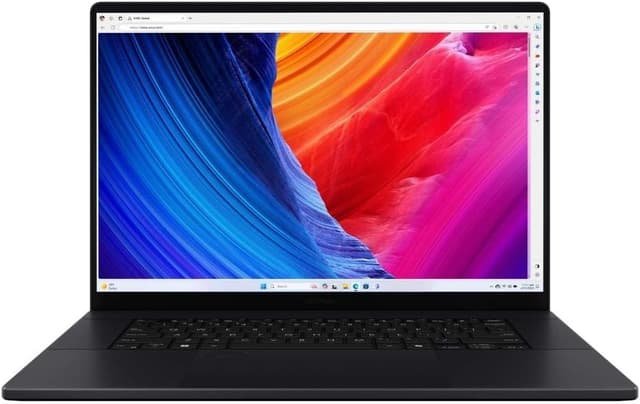
Side by side
| ASUS ProArt P16 (2025) | MacBook Air M4 | |
|---|---|---|
| OS | Windows 11 Pro | macOS |
| Processor | AMD Ryzen AI 9 HX 370 | Apple M4 (10-core CPU) |
| RAM | 64GB LPDDR5X | 16GB - 32GB |
| Storage | 2TB SSD | 256GB - 2TB SSD |
| GPU | NVIDIA RTX 5070 (8GB GDDR7) | Apple M4 (8 or 10-core) |
| Display | 16" 4K OLED Touch 3840x2400 | 13.6" Liquid Retina 2560x1664 |
| Weight | 4.08 lbs | 2.7 lbs |
| Battery | 90Wh | Up to 18 hours |
| Color Gamut | 100% DCI-P3, PANTONE Validated | — |
| Dimensions | 13.97 x 9.72 x 0.59-0.68 in | — |
| Price | Check price → | Check price → |
How they differ in real use
Built from our graphic design laptops scoring, each product's published specifications, and verified owner feedback — not hands-on testing.
Both the ASUS ProArt P16 (2025) and the MacBook Air M4 made our Top 5 Graphic Design Laptops, at #2 (best premium) and #5 (best value). The 2025 ProArt P16 is the best Windows pick for heavier creative work: its 4K OLED touchscreen (100% DCI-P3, PANTONE-validated, stylus support) rivals the MacBook Pro's display, and its RTX 5070 with 64GB of memory outpaces the XPS 15's older RTX 4070 platform for GPU-accelerated video and 3D, in a 4.08 lb chassis with ASUS's DialPad controller. It trails the MacBook Pro on battery life and sustained quiet operation. The MacBook Air M4 replaces the dead HP Envy listing as the lightweight value pick for Figma, Illustrator, Photoshop, and light creative work; it is not the right choice for heavy video or 3D.
We score graphic design laptops on Display Quality (35%), Performance (30%), Build Quality (15%), Portability (10%) and Value (10%). On that basis the ASUS ProArt P16 (2025) totals 9.1 out of 10 and the MacBook Air M4 8.3. The widest gap is Display Quality, where the ASUS ProArt P16 (2025) scores 10 against 8 for the MacBook Air M4: color accuracy, brightness. Performance also separates them: 9.5 for the ASUS ProArt P16 (2025) versus 8.1 for the MacBook Air M4. The MacBook Air M4 claws back ground on Portability and Value.
On paper, the specifications that actually differ: Operating System: Windows 11 Pro on the ASUS ProArt P16 (2025) versus macOS on the MacBook Air M4; CPU: AMD Ryzen AI 9 HX 370 on the ASUS ProArt P16 (2025) versus Apple M4 (10-core CPU) on the MacBook Air M4; RAM: 64GB LPDDR5X on the ASUS ProArt P16 (2025) versus 16GB - 32GB on the MacBook Air M4; Storage: 2TB SSD on the ASUS ProArt P16 (2025) versus 256GB - 2TB SSD on the MacBook Air M4; GPU: NVIDIA RTX 5070 (8GB GDDR7) on the ASUS ProArt P16 (2025) versus Apple M4 (8 or 10-core) on the MacBook Air M4; Display: 16" 4K OLED Touch 3840x2400 on the ASUS ProArt P16 (2025) versus 13.6" Liquid Retina 2560x1664 on the MacBook Air M4.
Check current pricing at the merchant links below. Owners praise the ASUS ProArt P16 (2025) for 16" 4K (3840x2400) OLED touchscreen with 100% DCI-P3 coverage, PANTONE validation and stylus support and ryzen AI 9 HX 370 and RTX 5070 for GPU-accelerated photo, video and 3D work; the most common complaint is memory is soldered and cannot be upgraded after purchase. Owners praise the MacBook Air M4 for exceptional battery life (up to 18 hours) and silent fanless design; the most common complaint is only 2 Thunderbolt ports.
ASUS ProArt P16 (2025)
- 16" 4K (3840x2400) OLED touchscreen with 100% DCI-P3 coverage, PANTONE validation and stylus support
- Ryzen AI 9 HX 370 and RTX 5070 for GPU-accelerated photo, video and 3D work
- 64GB of memory and a 2TB SSD in this configuration
- 4.08 lbs, light for a 16-inch laptop with a dedicated GPU
- Memory is soldered and cannot be upgraded after purchase
- The 4K OLED panel runs at 60Hz
- Expensive; sold on Amazon as an HIDevolution build (reseller-applied thermal paste) rather than a stock ASUS listing
MacBook Air M4
- Exceptional battery life (up to 18 hours)
- Silent fanless design
- 16GB RAM now standard
- M4 chip with 10-core CPU
- Only 2 Thunderbolt ports
- No ProMotion display (60Hz)
- Expensive for students
Which should you buy?
The ASUS ProArt P16 (2025) is the better fit for windows photo and video editors and color-critical design work; it is the higher-scoring pick here, chiefly for Display Quality and Performance. The MacBook Air M4 is the better fit for students wanting premium and macOS users, and the stronger choice if Portability and Value matter more to you than the overall score. The ASUS ProArt P16 (2025) is a poor fit for budget creatives; the MacBook Air M4 is a poor fit for budget students.
Choose the ASUS ProArt P16 (2025) if
- Windows photo and video editors
- Color-critical design work
- Illustrators who want a stylus-capable OLED
Skip it if
- Budget creatives
- Buyers who need upgradeable memory
Choose the MacBook Air M4 if
- Students wanting premium
- macOS users
- Long lecture days
Skip it if
- Budget students
- Windows users
Common questions
Is the ASUS ProArt P16 (2025) better than the MacBook Air M4?
In our Graphic Design Laptops ranking the ASUS ProArt P16 (2025) scores higher overall, 9.1 to 8.3, with the biggest advantage in Display Quality. The MacBook Air M4 is stronger on Portability and Value, so it is the better pick if those matter most to you.
What is the main difference between the ASUS ProArt P16 (2025) and the MacBook Air M4?
The headline spec difference is Operating System: Windows 11 Pro on the ASUS ProArt P16 (2025) versus macOS on the MacBook Air M4. In use, the gap that matters most is Display Quality (10 vs 8 in our scoring): color accuracy, brightness.